How to Generate an API Key
 Jamdesk Team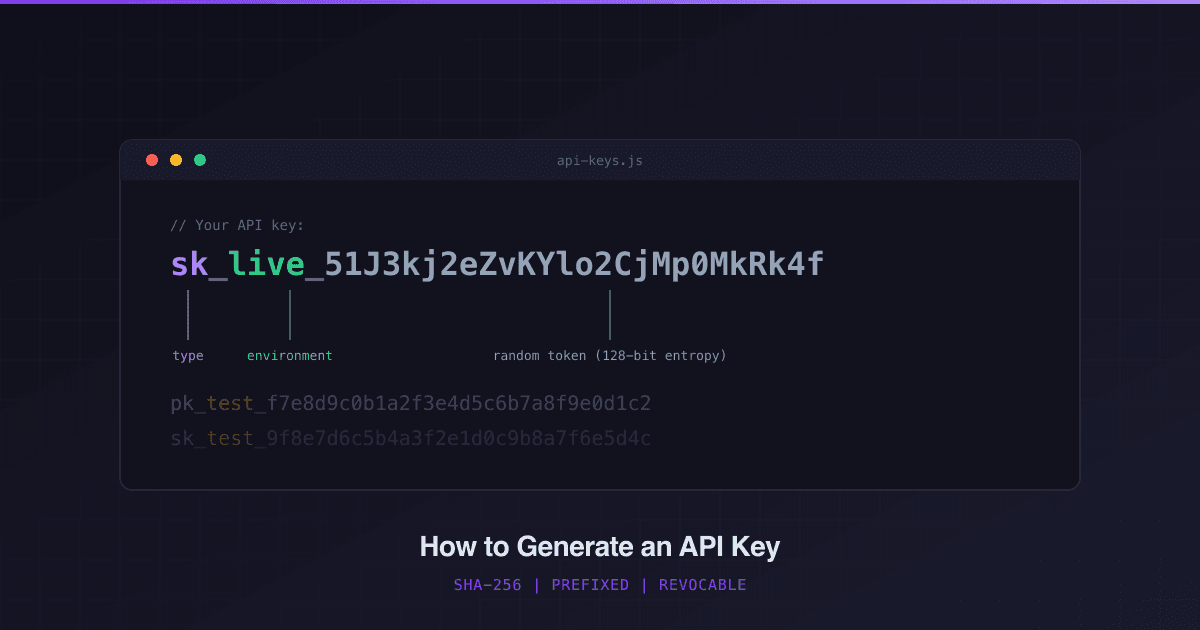
Since we entered the agentic AI era, APIs and CLIs have been thrust into the zeitgeist. I've been seeing Wall Street Journal articles mentioning both, which my nerd-self finds very cool.
If you own a SaaS, it means it is important for you to consider offering an API/CLI, and if so, you need to make sure it is secure or you risk your entire business.
GitGuardian found 28.6 million secrets exposed in public GitHub commits in 2025, a 34% jump year over year. Over 1.2 million of those were AI-service credentials alone, up 81% year over year (GitGuardian State of Secrets Sprawl 2026).
Most had no prefix, no hashing, and no revocation path, and the key was just "my-voice-is-my-passport" — just kidding on that last one, Sneakers fans.
To generate a secure API key, you use a cryptographically secure random number generator for 128 bits of randomness, add a type-and-environment prefix like sk_live_, and store only the SHA-256 hash.
If you keep reading, we'll go over the full lifecycle with working code in Node.js, Python, and Go, using Stripe API keys as a blueprint.
- Generate 128 bits of randomness from a CSPRNG
- Add a type-and-environment prefix like
sk_live_ - Store only the SHA-256 hash, and show the key exactly once
- Verify in four steps: format, hash, lookup, scope
- Revoke instantly, and rotate with a grace period
What Does a Good API Key Look Like?
Stripe's API keys is one of the most widely recognized and copied formats around. In my previous API company we used this as a model for our API keys.
Every key encodes three pieces of information before the random token even starts:
sk_live_a1b2c3d4e5f6a7b8c9d0e1f2a3b4c5d6
│  │     │
│  │     └─ Random token (the secret)
│  └─────── Environment (live or test)
└────────── Type (sk = secret, pk = publishable)
This design is intentional, and I personally love it for the expressiveness and simplicity.
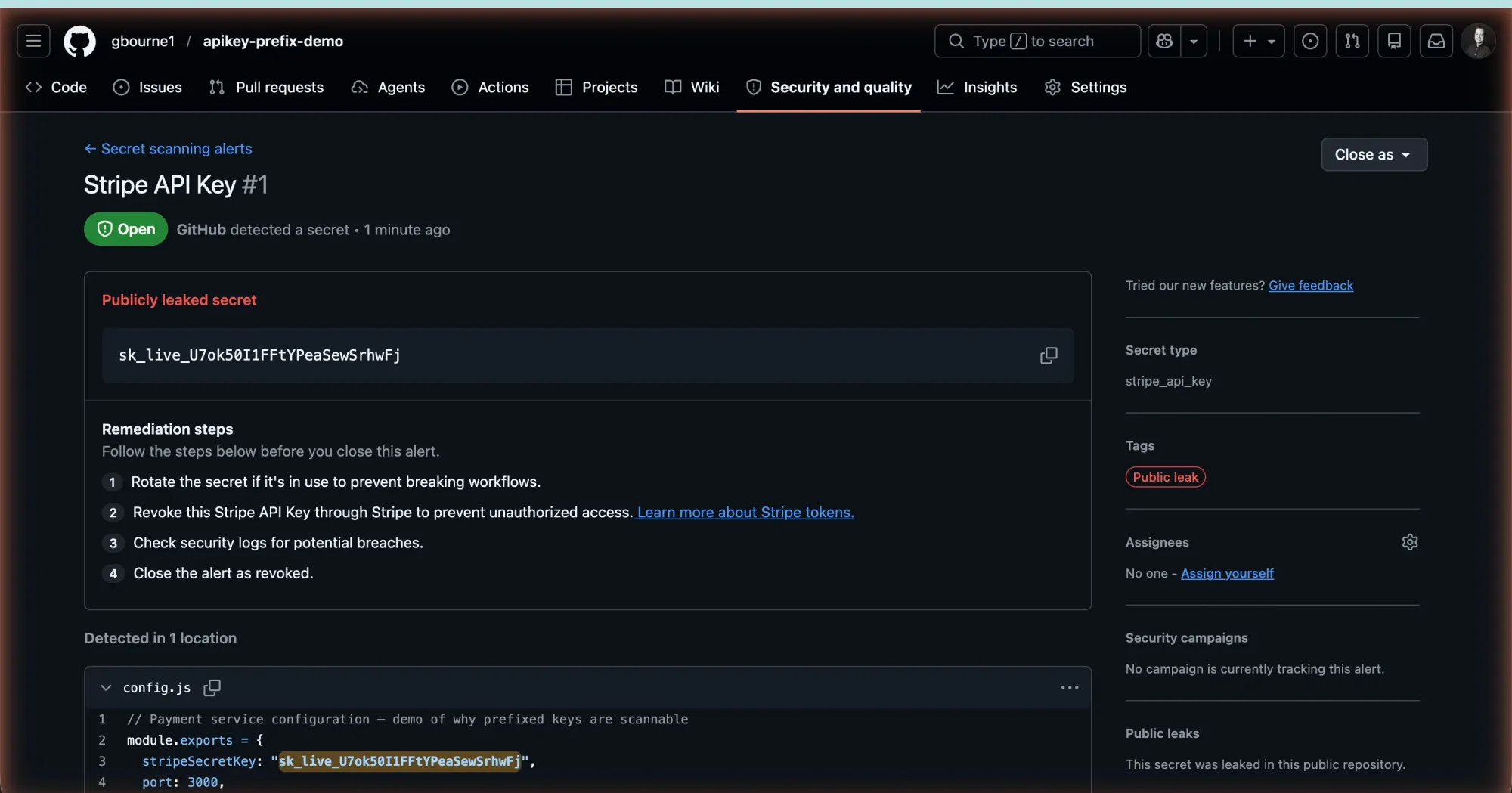
When GitHub overhauled their own token formats, they added identifiable prefixes (ghp_, gho_, ghs_) for the same reason: the old hex-only tokens were "indistinguishable from other encoded data like SHA hashes" and nearly impossible for scanners to detect (GitHub Engineering).
The same convention plays out across every major API:
| Provider | Format | Examples | What the Prefix Tells You |
|---|---|---|---|
| Stripe | {type}_{env}_{token} | sk_live_, pk_test_, rk_live_ | Key type + environment |
| GitHub | {co}{type}_{token} | ghp_, gho_, ghs_ | Company + token type |
| Twilio | {type}{token} | SK + 32 hex chars | Key type |
| AWS | {scope}{token} | AKIA, ASIA | Permanent vs. session |
The pattern: a human-readable prefix, then cryptographically random bytes. The examples below encode that token as hex, which is what randomBytes returns by default.
Stripe's real keys use a longer base62 alphabet; if you copy their format exactly, widen the validation regex from [0-9a-f] to [A-Za-z0-9].
Publishable vs. Secret Keys
Stripe splits keys into two categories because the trust boundary matters:
pk_live_/pk_test_(publishable). Safe to embed in frontend JavaScript. These keys can only create tokens (e.g., tokenize a credit card via Stripe.js). They can't read customer data, issue refunds, or make charges.sk_live_/sk_test_(secret). Full API access. Server-side only. If this key leaks, an attacker can move money.
Now, you may not have this situation and only have a back-end process or only front-end access. When you're designing your own API, ask: does this client need full access, or just enough to submit data?
That answer determines whether to issue a pk_ or sk_ key. Whether you are back-end access only or front-end access only, you should still consider this pattern.
For more on how APIs work under the hood, see our guide on what an API actually is.
Step 1: Generate Cryptographically Random Bytes
The entropy source matters more than anything else. Use your platform's CSPRNG (Cryptographically Secure Pseudorandom Number Generator — say that 3 times fast). Don't use Math.random() or uuid.v4(), and definitely not timestamps.
Node.js:
import { randomBytes } from 'crypto';

const token = randomBytes(16).toString('hex');
// → "a1b2c3d4e5f6a7b8c9d0e1f2a3b4c5d6" (32 hex chars, 128 bits)
Python:
import secrets

token = secrets.token_hex(16)
# → "a1b2c3d4e5f6a7b8c9d0e1f2a3b4c5d6"
Go:
import (
    "crypto/rand"
    "encoding/hex"
    "fmt"
)

func generateToken() (string, error) {
    b := make([]byte, 16)
    if _, err := rand.Read(b); err != nil {
        return "", fmt.Errorf("CSPRNG failed: %w", err)
    }
    return hex.EncodeToString(b), nil
    // → "a1b2c3d4e5f6a7b8c9d0e1f2a3b4c5d6"
}
Sixteen bytes gives you 128 bits of entropy: 3.4 × 10³⁸ possible values. Brute-forcing that at a billion guesses per second would take 10²² years — unless the newfangled quantum computers become generally available, and then all bets are off.
Why not UUIDs? A v4 UUID gives you 122 random bits, which is plenty of entropy, and crypto.randomUUID() is CSPRNG-backed, so randomness isn't the problem.
Format control is: the fixed 8-4-4-4-12 shape leaks structure, can't carry a type-and-environment prefix, and forces dashes into your tokens. Raw randomBytes is the better fit when you want prefixes and a compact format.
Step 2: Add Environment-Aware Prefixes
You might — well, should — have at least two types of keys. One for your users' live site and one for the sandbox. If you don't have a sandbox yet, this is still a good practice since you may one day.
With Stripe's {type}_{environment}_ pattern every key becomes self-documenting and describes the environment:
import { randomBytes } from 'crypto';

function generateApiKey(type, environment) {
  const token = randomBytes(16).toString('hex');
  return `${type}_${environment}_${token}`;
}

// Publishable keys — safe for client-side code
generateApiKey('pk', 'live');
// → "pk_live_a1b2c3d4e5f6a7b8c9d0e1f2a3b4c5d6"

generateApiKey('pk', 'test');
// → "pk_test_f7e8d9c0b1a2f3e4d5c6b7a8f9e0d1c2"

// Secret keys — server-side only, never expose
generateApiKey('sk', 'live');
// → "sk_live_1a2b3c4d5e6f7a8b9c0d1e2f3a4b5c6d"

generateApiKey('sk', 'test');
// → "sk_test_9f8e7d6c5b4a3f2e1d0c9b8a7f6e5d4c"
Stripe also offers restricted keys (rk_live_, rk_test_) with scoped permissions. If your API needs granular access control, that is a third type you can add.
Just register its prefix in the validation patterns (Step 4) and the Express middleware below, or every restricted key will fail the format check.
The prefix is great because:
- Secret scanning. GitHub, GitGuardian, and TruffleHog all match on known prefixes. A bare hex string flies under every scanner. A prefixed key triggers alerts within minutes of being pushed — especially if it is published on a public repo.
- Debugging speed. When
pk_test_appears in production logs, you know the client is misconfigured. Stripe gives some great error messaging if you try to use a live key in sandbox and vice versa. - Cheap validation. A regex check rejects malformed tokens before they touch your datastore. You can do this right in your middleware. More on this in Step 4.
Step 3: Hash Before You Store
One rule for all production systems: never store the plaintext key. Store its SHA-256 hash in your database. If you are in the EU (GDPR), want to be SOC 2 compliant, or get Enterprise clients, you'll be asked this.
import { createHash, randomBytes } from 'crypto';

function hashApiKey(rawKey) {
  return createHash('sha256').update(rawKey).digest('hex');
}

// At generation time:
const rawKey = generateApiKey('sk', 'live');
const hash = hashApiKey(rawKey);

// Store `hash` in your database
// Return `rawKey` to the user exactly ONCE
console.log('Your API key (copy it now — you won\'t see it again):');
console.log(rawKey);

// What gets saved to the database:
// { id: "key_8f3a", hash: "7f83b1657ff1fc53...", prefix: "sk_live", last4: "c5d6", createdAt: 1713196800000 }
Python equivalent:
import hashlib

def hash_api_key(raw_key: str) -> str:
    return hashlib.sha256(raw_key.encode()).hexdigest()
If you're thinking about using bcrypt, don't. API keys aren't passwords. They already carry 128 bits of entropy, so rainbow tables and dictionary attacks don't apply.
SHA-256 is fast, deterministic, and produces a fixed 64-character hex digest that works well as a database lookup key. Bcrypt's intentional slowness would add latency to every API request for zero security gain.
For one more line of defense, hash with HMAC-SHA256 and a server-side pepper instead of plain SHA-256.
If your hash table ever leaks, plain digests are directly verifiable by anyone who can generate candidate keys; an HMAC pepper makes a stolen table useless without the secret:
import { createHmac } from 'crypto';

// PEPPER comes from your secret manager, never the database
const hashApiKey = (rawKey) =>
  createHmac('sha256', process.env.API_KEY_PEPPER).update(rawKey).digest('hex');
Hash incoming tokens the same way at verify time and the rest of the flow is unchanged.
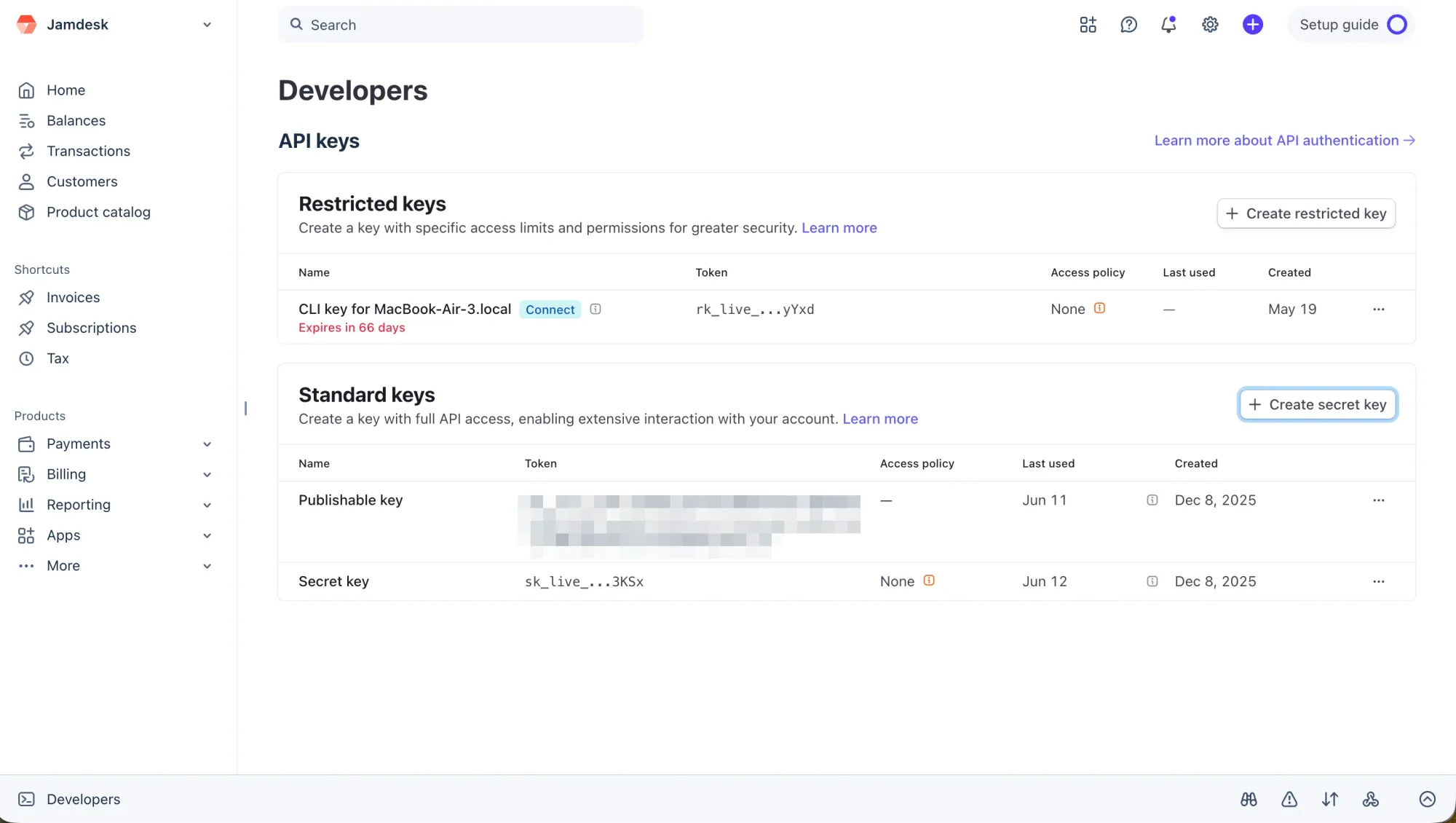
Stripe, GitHub, and Twilio all follow this show-once pattern. If a user loses their key, they can't recover it and they must revoke and regenerate. A bit of user friction, but the right way for security.
Store one non-secret hint alongside the hash: the prefix plus the last four characters (Stripe shows sk_live_…c5d6). You can't display the key again, so without that hint your dashboard can't tell two keys apart in a list.
Long-lived secrets account for 60% of credential policy violations, according to GitGuardian's State of Secrets Sprawl 2026 report (Help Net Security, 2026). Hashing is the cheapest mitigation you'll ever ship.
Step 4: Verify Keys at Runtime
When a request arrives with a Bearer token, run four checks in this order:
- Validate the format (regex, no I/O)
- Hash the token (SHA-256, CPU only)
- Look up the hash (one DB or Redis read)
- Check scope (project, environment, permissions)
import { createHash } from 'crypto';

const KEY_PATTERN = /^sk_(live|test)_[0-9a-f]{32}$/;

async function verifyApiKey(rawKey, expectedProject) {
  // 1. Format gate — rejects garbage before any I/O
  if (!KEY_PATTERN.test(rawKey)) {
    return { ok: false, reason: 'invalid_format' };
  }

  // 2. Hash the incoming token (~0.01ms, CPU only)
  const hash = createHash('sha256').update(rawKey).digest('hex');

  // 3. Single O(1) lookup from Redis or your DB
  const record = await redis.get(`apikey:${hash}`);
  if (!record) {
    return { ok: false, reason: 'invalid_key' };
  }

  // 4. Scope check — does this key belong to this project?
  const data = typeof record === 'string' ? JSON.parse(record) : record;
  if (data.projectId !== expectedProject) {
    return { ok: false, reason: 'wrong_project' };
  }

  return { ok: true, id: data.id };
}
Notice the regex targets ^sk_, not ^(pk|sk)_. Narrow the pattern to the key type your endpoint expects, so a server-side search API should reject publishable keys and a client-side tokenization endpoint should reject secret keys. Be sure to use one regex per endpoint type.
For high-throughput APIs, put the hash lookup in Redis rather than your primary database for faster in-memory lookups. The read is O(1) by hash, handles thousands of requests per second, and revocation is just a DEL on the key.
I recommend treating Redis as a cache, not the system of record. I believe your DB should always be the system of record, and I've seen more than one Redis cache get unintentionally wiped.
For example, if Redis runs an eviction policy like allkeys-lru, a still-valid key can be evicted and a paying customer gets a spurious invalid_key; on a cache miss, fall through to your database and repopulate, or pin key records with noeviction or a dedicated instance.
Step 5: Revoke and Rotate
Note: some of this is more advanced, so you can skip or breeze through this section.
Your users will need to revoke their keys at some point, or you'll want to do it on their behalf.
Revocation has one detail the other steps don't: the caller has the key's id (from your dashboard or admin API), not the raw key or its hash.
The raw key was shown once at creation and never stored. So the flow is:
- Look up the record by
idto retrieve the storedhash. - Delete
apikey:{hash}from your store so verify calls fail immediately. And don't forget removing from Redis or your cache. - Mark the record as revoked for your audit trail.
async function revokeKey(store, db, keyId) {
  // 1. Find the stored hash via the key's management ID
  const record = await db.findKeyById(keyId);
  if (!record) throw new Error('Key not found');

  // 2. Remove the hot-path lookup — future verify calls return invalid_key
  await store.del(`apikey:${record.hash}`);

  // 3. Mark as revoked for auditing
  await db.updateKey(keyId, {
    enabled: false,
    revokedAt: Date.now(),
  });
}
If you really want to get advanced, for rotation, generate the new key before revoking the old one. Store both hashes in parallel during a grace period, then delete the old hash.
Stripe gives you a configurable expiration window for the outgoing key. You can build the same into your admin API so clients don't break mid-request.
One caveat: a grace period is for planned rotation. If a key is actually compromised, skip the overlap and revoke it immediately, because the old key keeps its full scope for as long as both hashes are live.
If you add key expiry on top of rotation, a scheduled sweep that disables stale keys is all you need — a simple cron job covers it.
Express Middleware
If you're using Node.js Express, verifyApiKey becomes real middleware with one wrapper function:
// middleware/api-auth.js
import { createHash } from 'crypto';
import { redis } from '../lib/redis.js';

const PATTERNS = {
  secret:      /^sk_(live|test)_[0-9a-f]{32}$/,
  publishable: /^pk_(live|test)_[0-9a-f]{32}$/,
  restricted:  /^rk_(live|test)_[0-9a-f]{32}$/,
};

export function requireKey(type = 'secret') {
  const pattern = PATTERNS[type];

  return async (req, res, next) => {
    const token = req.headers.authorization?.replace('Bearer ', '');

    if (!token || !pattern.test(token)) {
      return res.status(401).json({ error: 'invalid_key_format' });
    }

    const hash = createHash('sha256').update(token).digest('hex');
    const raw = await redis.get(`apikey:${hash}`);

    if (!raw) {
      return res.status(401).json({ error: 'invalid_key' });
    }

    const data = typeof raw === 'string' ? JSON.parse(raw) : raw;
    req.apiKey = { id: data.id, projectId: data.projectId, type };
    next();
  };
}
Wire it into your routes:
import express from 'express';
import { requireKey } from './middleware/api-auth.js';

const app = express();
app.use(express.json());

// Server-side endpoint — only sk_live_ and sk_test_ keys accepted
app.post('/v1/search', requireKey('secret'), (req, res) => {
  console.log(`Authenticated key: ${req.apiKey.id}`);
  res.json({ results: ['...'] });
});

// Client-side endpoint — only pk_live_ and pk_test_ keys accepted
app.post('/v1/tokenize', requireKey('publishable'), (req, res) => {
  res.json({ token: 'tok_...' });
});
Test it with curl:
curl -X POST http://localhost:3000/v1/search \
  -H "Authorization: Bearer sk_live_a1b2c3d4e5f6a7b8c9d0e1f2a3b4c5d6" \
  -H "Content-Type: application/json" \
  -d '{"query": "test"}'
Or from a client app:
const res = await fetch('https://api.example.com/v1/search', {
  method: 'POST',
  headers: {
    'Authorization': `Bearer ${process.env.API_SECRET_KEY}`,
    'Content-Type': 'application/json',
  },
  body: JSON.stringify({ query: 'test' }),
});
Keep keys in environment variables, never in source code:
# .env — add this file to .gitignore BEFORE your first commit
API_SECRET_KEY=sk_live_a1b2c3d4e5f6a7b8c9d0e1f2a3b4c5d6
6 Mistakes That Get API Keys Leaked
Skipping the prefix. Millions of commits flow into public repositories every day. Without a recognizable pattern, your leaked key is invisible to every scanner on the planet. Eight characters of prefix buys you automatic detection.
Hardcoding keys in frontend bundles. An sk_live_ token in a React component ships to every browser that loads your app. Use pk_ keys client-side and keep sk_ keys behind server-side environment variables.
Logging the raw key in error handlers. A failed auth check that logs token=${rawKey} puts plaintext credentials in your log aggregator, searchable by anyone with Datadog access. Log the key's id field instead.
Committing .env files. Your .env belongs in .gitignore before the first commit. GitGuardian found 24,008 unique secrets exposed in MCP configuration files in 2025 alone (GitGuardian State of Secrets Sprawl 2026).
No rate limit on the verify path. The keyspace is too large to brute-force, but that is not the real attack. Leaked and stuffed keys get replayed against your auth endpoint thousands of times a minute.
Throttle failed verifications per IP and per key prefix so a stolen key trips a limit instead of running free.
No revocation endpoint. Build one on day one, even if nobody uses it yet.
99% of surveyed organizations hit at least one API security issue in the prior 12 months (CybelAngel, 2025). When a key leaks, and statistically it will, a single DEL command is all that stands between the attacker and your data.
And when a leak forces a mass revocation, treat it as an incident that need to be communicated to affected customers.
What to Build Next
Five functions cover the entire key lifecycle: generate, hash, store, verify, revoke. Stripe runs this architecture at massive scale, so you know it works.
If you're building API documentation alongside your keys, Jamdesk turns your OpenAPI spec into interactive docs with a built-in playground, so developers can test endpoints with their own keys. For a wider look at the options, see our roundup of the best API documentation tools.
In summary, start with pk_test_ and sk_test_. Ship the generate and verify endpoints, then add rotation when you need it.