How to Resolve Promises Sequentially in JavaScript
 Jamdesk Team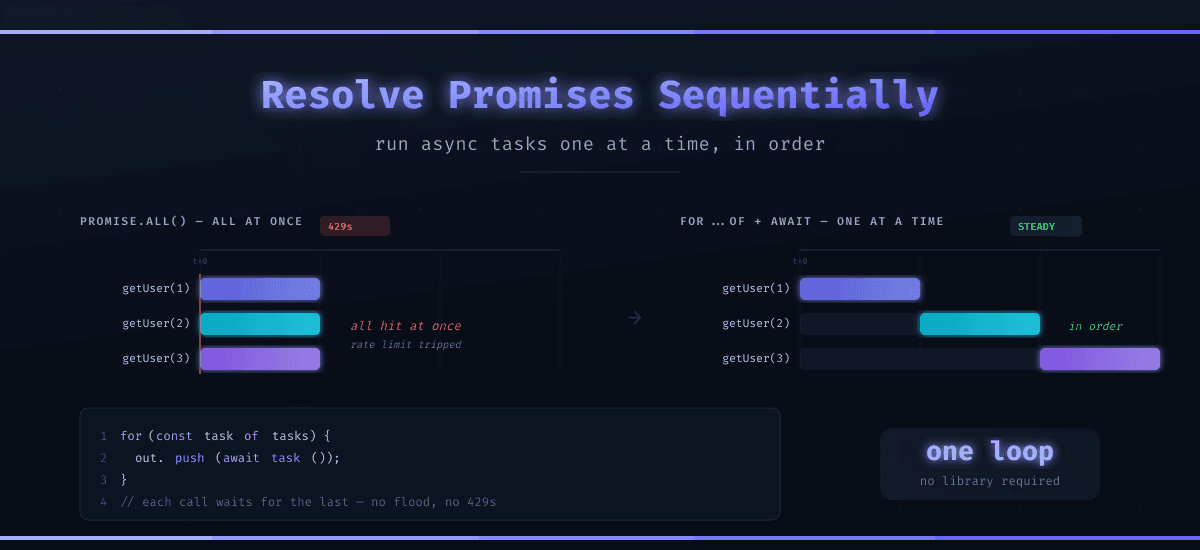
In JavaScript, the Promise.all() function is one of your best tools when you want to do async work. You can fire everything off, wait for the slowest one to complete, and then continue processing. However, sometimes running it all at once is exactly what breaks production.
When you need promises to run in order, one finishing before the next begins, the answer is a for...of loop with await inside it. Easy right? Well, the catch is a subtlety that bites almost everyone the first time; if you've already created your promises, they've already started (whoops). Awaiting them in order doesn't make the work sequential. It just makes you wait while it all runs at once anyway.
Why Would You Run Promises Sequentially?
Because all-at-once isn't free. Every concurrent promise is a concurrent connection, a concurrent write, another request landing on something that may have a rate limit.
On the social API I worked on at my previous company, we social analytics jobs that gathers data for hundreds of posts, with multiple API calls per post. The first version mapped them straight into Promise.all(). In production it slammed thousands of simultaneous requests to the social media networks, tripped the rate limit, and the whole job fell over.
*the social networks' APIs have severe limit and basically you need to make sequential calls.
The solution wasn't more retries, but rather to stop asking for everything at once. Sequential resolution allowed us to stay within the social network APIs rate limits, and the job started finishing instead of failing.
Same story shows up whenever order matters: database migrations that have to run in sequence, writes where step two depends on step one landing first, or any API that starts returning 429 the second you get enthusiastic.
Why forEach and map Won't Wait
This is the crux of the problem that sends most people searching for an answer in the first place: you use forEach, add an await inside each callback fully expecting it to pause between items, and instead the loop sprints right past every one of them without waiting. Unfortunately, this doesn't work, and yes, JavaScript can sometime suck.
// Looks sequential. Isn't.
[id1, id2, id3].forEach(async (id) => {
  const user = await getUser(id);
  console.log(user.name);
});
console.log("Done!"); // Prints FIRST, before any user
forEach doesn't understand promises. The callback returns one, forEach shrugs and throws it away, and all three lookups launch on the same tick. "Done!" logs before a single user comes back, and you haven't sequenced anything. You've just made the chaos harder to see.
The same applies to .map() if you're after ordering. .map() is great for building an array of promises to hand to Promise.all(), but the mapping itself kicks every promise off immediately. Map for concurrency. Loop for sequence.
The Sequential Pattern: for...of With await
This is the version that actually works. A plain for...of loop pauses at each await, so the next iteration doesn't start until the current promise resolves.
const resolveSequentially = async (tasks) => {
  const results = [];
  for (const task of tasks) {
    results.push(await task());
  }
  return results;
};
Notice task(), not task. That parenthesis is the entire point. We pass an array of functions, and call each one inside the loop, so the promise isn't created until its turn comes up. Defer the creation and you defer the work.
Compare the two ways to feed it:
// Wrong: every getUser() fires during .map(), all at once. Awaiting them
// in a loop afterward orders the results, not the work.
const started = uids.map((uid) => getUser(uid));
const results = [];
for (const p of started) results.push(await p);

// Right: each getUser() fires only when the loop reaches it.
const tasks = uids.map((uid) => () => getUser(uid));
await resolveSequentially(tasks);
The difference is all timing: the first version calls getUser while building the array, so every request is already in flight before the loop even runs. Only the second one actually protects Firebase, because only the second one defers each call until the loop reaches it. This is the bit most tutorials gloss over. If your goal is to ease load and not just collect results in order, you have to hand the loop work it hasn't begun yet.
How Do You Handle Errors Mid-Loop?
One rejection in a for...of loop throws straight out and abandons every task you hadn't reached yet. Sometimes that's what you want. Often it isn't, especially in a batch job where one bad record shouldn't sink the other 2,000.
Wrap each call and decide per item:
const resolveSettled = async (tasks) => {
  const results = [];
  for (const task of tasks) {
    try {
      results.push({ status: "fulfilled", value: await task() });
    } catch (error) {
      results.push({ status: "rejected", reason: error });
    }
  }
  return results;
};
That's Promise.allSettled() behavior, one task at a time. Keep going, record what failed, sort it out at the end. If instead you want to bail on the first error, skip the try/catch and let it throw. The loop stops exactly where it broke, which is handy when later steps depend on earlier ones succeeding.
What About for await...of?
When the source itself is async, not just the work, for await...of is the cleaner tool. It's built for async iterables, specifically a paginated endpoint, a database cursor, a readable stream. Each iteration awaits the next chunk before handing it to you.
async function* fetchPages(url) {
  let next = url;
  while (next) {
    const res = await fetch(next);
    const page = await res.json();
    yield page.items;
    next = page.nextPageUrl;
  }
}

for await (const items of fetchPages("/api/users")) {
  await saveBatch(items); // one page lands before the next is requested
}
You never hold every page in memory, and you never request page two before page one is safely written. for...of sequences tasks you already have. for await...of sequences tasks that arrive over time. Reach for it when the data shows up lazily (MDN: for await...of).
Sequential or Concurrent: Which Do You Actually Need?
Most of the time the honest answer is "neither extreme." Picking by what each one optimizes for:
| Approach | How | Best for | Cost |
|---|---|---|---|
| All at once | Promise.all() | Independent calls, speed matters | Floods rate-limited services |
| One at a time | for...of + await | Ordered writes, strict rate limits | Slow: the sum of every call |
| N at a time | Batches or a concurrency limiter | The real world | A few more lines of code |
Pure sequential is the safe default when something downstream is fragile, but it leaves a lot of speed on the table. Run a thousand tasks one at a time and you wait for all thousand end to end. The middle ground, processing a handful at a time, usually wins: fast enough to finish, gentle enough not to get throttled. A small helper or a library like p-limit caps how many promises run at once, and that's a post of its own.
For now, the rule is simple. Independent and urgent, use Promise.all(). Ordered or rate-limited, loop with await. Somewhere between, cap your concurrency.
Wrapping Up
Sequential promise resolution comes down to one loop and one habit: pass functions, not already-running promises, so the work waits its turn. And don't forget to add a try/catch when a single failure shouldn't end the batch, and graduate to for await...of when the data itself arrives asynchronously.