The Definitive API Documentation Pricing Comparison [2026]
 Jamdesk Team
![The Definitive API Documentation Pricing Comparison [2026]](/_next/image?url=https%3A%2F%2Fcms.jamdesk.com%2Fcontent%2Fimages%2F2026%2F04%2Fchart-1-hero-v2-1.png&w=3840&q=75)
What eight platforms actually cost when you factor in seats, AI add-ons, and the features you will need six months from now.
Executive Summary
API documentation platforms have reached broad feature convergence. Most established players now offer OpenAPI rendering, markdown-based editing, custom domains, and some form of AI-powered search or chat. Yet behind this surface-level similarity, pricing structures diverge sharply. Two platforms offering nearly identical capabilities will produce twelve-month invoices differing by tens of thousands of dollars. The gap between an advertised starting price and the actual cost a team pays after accounting for seats, AI add-ons, analytics tiers, and branding removal has become a challenge for engineering leaders evaluating documentation tooling in 2026.
This report provides an apples-to-apples cost analysis of eight documentation platforms: Jamdesk, Mintlify, GitBook, ReadMe, Redocly, Stoplight, Document360, and Archbee. We evaluate each platform across two real-world scenarios. Scenario A models a small startup with one documentation site and three editors. Scenario B models a scaling organization with five documentation sites and thirty editors. Both scenarios hold constant a set of features that most production documentation deployments require within their first year: a custom domain, AI-powered chat or search, usage analytics, branding removal, and OpenAPI specification support [1].
The findings are significant. For a three-person team running a single documentation site with the full feature set described above, twelve-month (annual) total costs range from $348 (Jamdesk Pro) [2] to $6,600 (ReadMe with add-ons) [3]. For a thirty-person team managing five sites, costs range from $1,068 per year on Jamdesk Pro with extras [2] to over $39,000 per year on ReadMe [4]. Platforms that appear affordable at first glance frequently gate the features teams need behind higher tiers or paid add-ons. AI capabilities have emerged as the most aggressively monetized feature category, with several vendors charging $150 per month or more for AI chat functionality on top of already-premium base plans [5].
The purpose of this analysis is to give engineering managers, developer experience leads, and technical writers the data needed to forecast real costs over a twelve-month horizon rather than making purchasing decisions based on landing-page pricing alone.
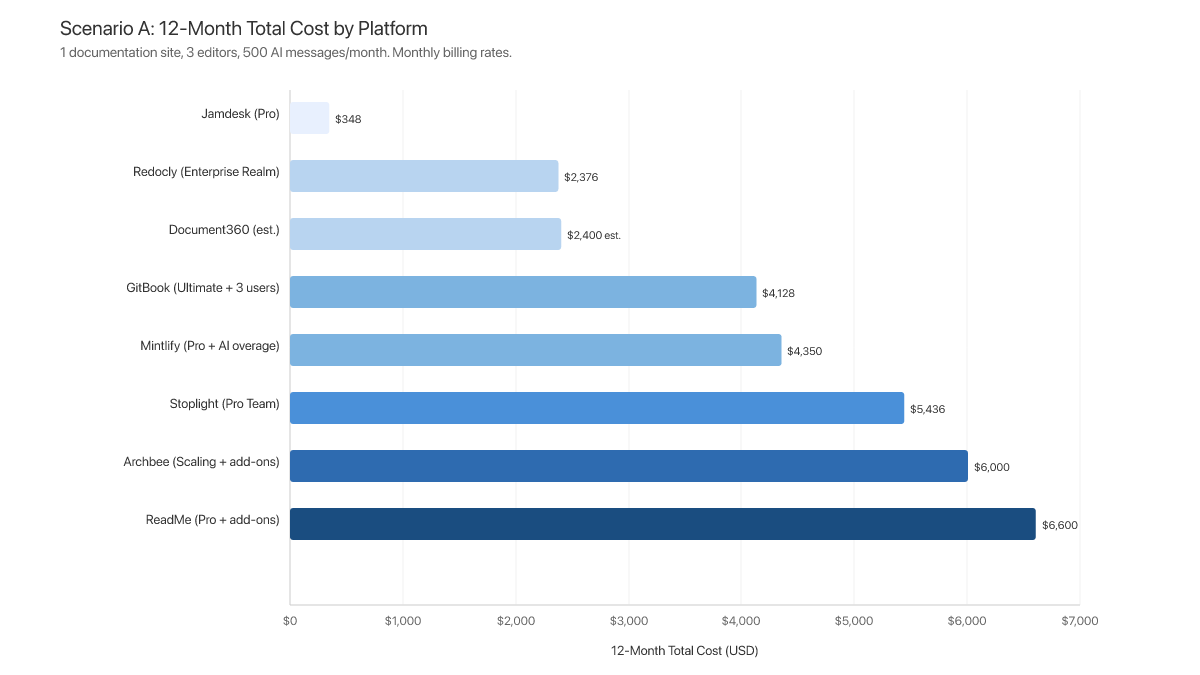
A note on billing cadence: All prices in this report use monthly billing rates unless otherwise noted. Many vendors offer discounts of 15 to 20 percent for annual commitments, but monthly billing represents the true list price and we find it usually the default option when a company subscribes to a new SaaS. Where annual pricing differs materially, we note both figures.
Methodology
All pricing data in this report was collected from vendor pricing pages and public documentation between March 10 and March 23, 2026, and re-verified in April 2026 [6]. Mintlify's pricing was re-verified in July 2026 after the vendor replaced its $300-per-month Pro tier with a flat $540-per-month Pro plan (no per-seat charges) and credit-metered AI; Mintlify figures in the tables and text reflect the July 2026 structure, while charts generated from the spring dataset may still show the earlier Mintlify totals. Jamdesk's team-member pricing was also re-verified in July 2026: team members are now unlimited on every plan at no extra charge. Where vendors do not publish pricing (as with Document360, which moved to quote-based pricing in late 2024 [7]), we note the absence and provide estimated ranges drawn from third-party review platforms and industry analyst reports.
We constructed two evaluation scenarios to reflect common team configurations. Scenario A models a small startup or early-stage team: one documentation site with three editors. Scenario B models a scaling organization: five documentation sites with thirty editors distributed across them.
Both scenarios assume the team requires a core set of capabilities within the first twelve months: a custom domain with SSL, AI-powered chat or search for end users, a usage analytics dashboard, removal of the vendor's branding from the published site, and OpenAPI specification import or rendering [8].
For AI usage estimates, we assume moderate consumption: 500 AI messages per month for Scenario A and 3,000 AI messages per month across all sites for Scenario B. These figures represent roughly five to seven AI queries per user per business day, a conservative but realistic estimate for teams with active API consumers.
Total cost of ownership is calculated as the sum of base subscription fees, per-seat charges, AI feature add-ons, AI overage charges, and analytics add-ons over a twelve-month period. All prices reflect monthly billing unless otherwise stated.
We will note that Docusaurus was considered but excluded from this comparison. As a free open-source static site generator, it does not include AI-powered search, analytics, managed hosting, branding removal, or customer support, and does not meet the minimum feature set defined in our scenarios [9].
The Pricing Environment in 2026
How We Got Here
The API documentation market has gone through three distinct phases in the past decade. The first phase was dominated by static site generators. Tools like Sphinx, Jekyll, Gatsby, and eventually Docusaurus gave engineering teams full control over their documentation output at the cost of significant setup and ongoing maintenance time. These tools were free in licensing terms, but expensive in engineering hours, and they produced documentation sites that often lacked interactive features like API playgrounds, search, and analytics [10].
The second phase, roughly 2018 through 2023, saw the rise of managed documentation platforms. GitBook, ReadMe, Mintlify, and others offered hosted, no-configuration solutions that traded some customization flexibility for dramatically faster time-to-publish. These platforms competed primarily on developer experience, design quality, and integration depth. Pricing was generally straightforward during this period: most platforms charged a flat monthly fee or a simple per-seat rate, and the feature sets across tiers were relatively transparent [11].
The third and current phase began in 2024 when large language models became practical to deploy as documentation assistants. Nearly every managed platform added some form of AI-powered search, chat, or content generation capability within an eighteen-month window. The technical cost of serving AI queries (inference compute, embedding generation, vector storage) gave vendors a defensible rationale for creating new pricing tiers and add-on charges specifically around AI features [12]. A market converging on feature parity suddenly found a new axis of differentiation: not whether a platform offered AI, but how much a team would pay to use AI.
This shift matters because AI-powered documentation search is moving from a differentiator to a baseline expectation. The 2025 Stack Overflow Developer Survey reports that 84 percent of developers use or plan to use AI tools in their development process, and that more than half of heavy AI users rely on AI to search for answers and troubleshoot issues [13]. Platforms that gate this capability behind premium tiers or usage-based add-ons impose an ongoing cost on meeting user expectations, one that compounds as documentation traffic grows.
Documentation as AI Infrastructure
The pricing conversation sits within a broader shift in what documentation has become. Documentation in 2026 is no longer a static support asset that users read passively. Documentation has evolved into a knowledge layer, a dataset that AI systems consume, interpret, and serve back to users through chat interfaces, code assistants, and automated workflows. When an AI agent retrieves incorrect or outdated information from your documentation, users will rightfully be disappointed in your product and will likely stop using the product.
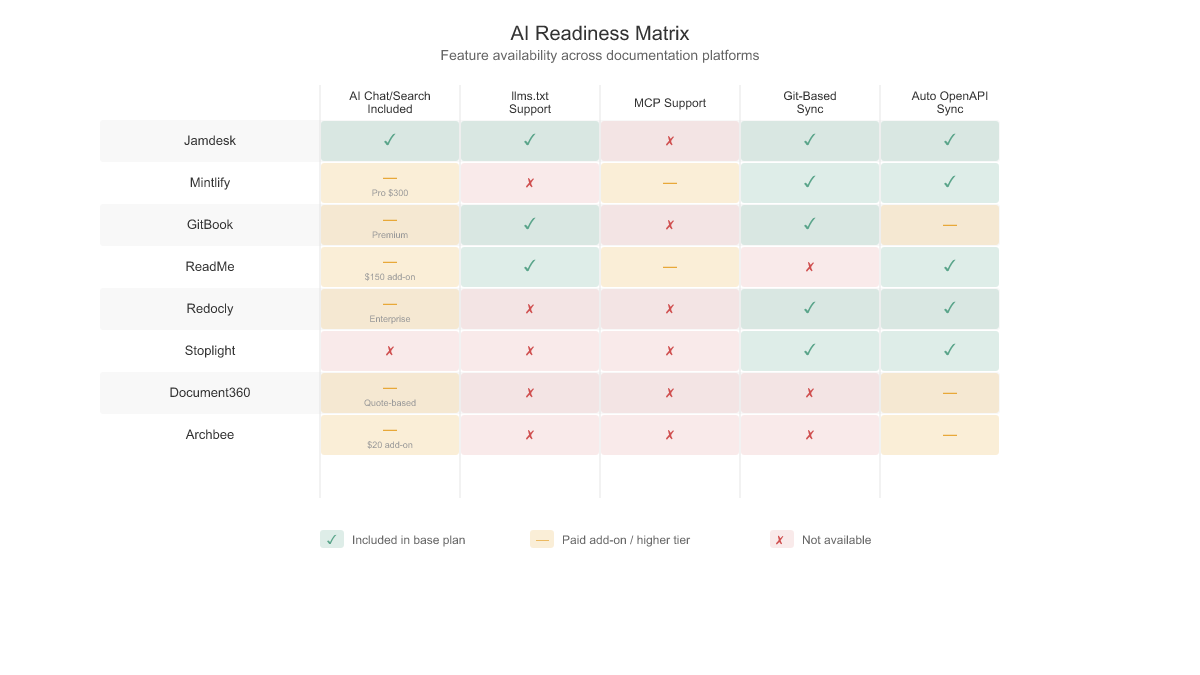
This means the structured formats a documentation platform supports are no longer optional technical niceties and are core to your infrastructure. Three formats have emerged as essential for modern AI-native documentation:
- OpenAPI and Swagger specifications provide a machine-readable blueprint for APIs. Platforms that synchronize these directly with the codebase automatically generate interactive references, ensuring the AI's source of truth stays aligned with the production environment. Every platform in this analysis supports OpenAPI to some degree, but the depth of integration (automatic sync versus manual import) varies significantly.
- llms.txt is a standard that provides a dedicated, simplified text-only entry point for LLM consumption. AI tools ingest core product functionality through this file without the noise of HTML boilerplate or UI elements. Of the eight platforms analyzed, only Jamdesk (auto-generated) [2], GitBook (auto-generated, including llms-full.txt) [23], and ReadMe (included on free tier) [4] support llms.txt natively. The remaining six platforms require manual implementation or do not support the format at all.
- Model Context Protocol (MCP) and Command Line Interfaces (CLIs) represent the next evolution beyond static exports. Unlike llms.txt, which is a file that AI tools fetch on demand, MCP is a live connection protocol that exposes documentation as a real-time data source for AI tools during active user sessions. CLIs serve a different but complementary role. A documentation CLI lets developers preview docs locally, validate OpenAPI specs, sync content from the command line, and integrate documentation workflows into CI/CD pipelines without leaving the terminal. For teams that treat documentation as code, a CLI is the primary interface for building, testing, and deploying docs. Several platforms now ship CLIs: Jamdesk, Mintlify, ReadMe, Redocly, and Stoplight all offer command-line tools with varying levels of functionality [2][14][4][17][18].
The risk these formats address is Knowledge Drift, the divergence between code and documentation that occurs when synchronization is manual or delayed. When code and docs diverge, AI assistants produce hallucinations. Automating the synchronization between repositories and documentation through Git-based workflows is the primary defense. This is why docs-as-code platforms that store content in Git repositories and deploy through CI/CD pipelines have a structural advantage over platforms that rely on web-based editors with manual publishing workflows.
The implication for pricing evaluation is direct: the cost of AI features should be weighed against the operational cost of documentation that AI tools cannot read or trust.
Four Pricing Models
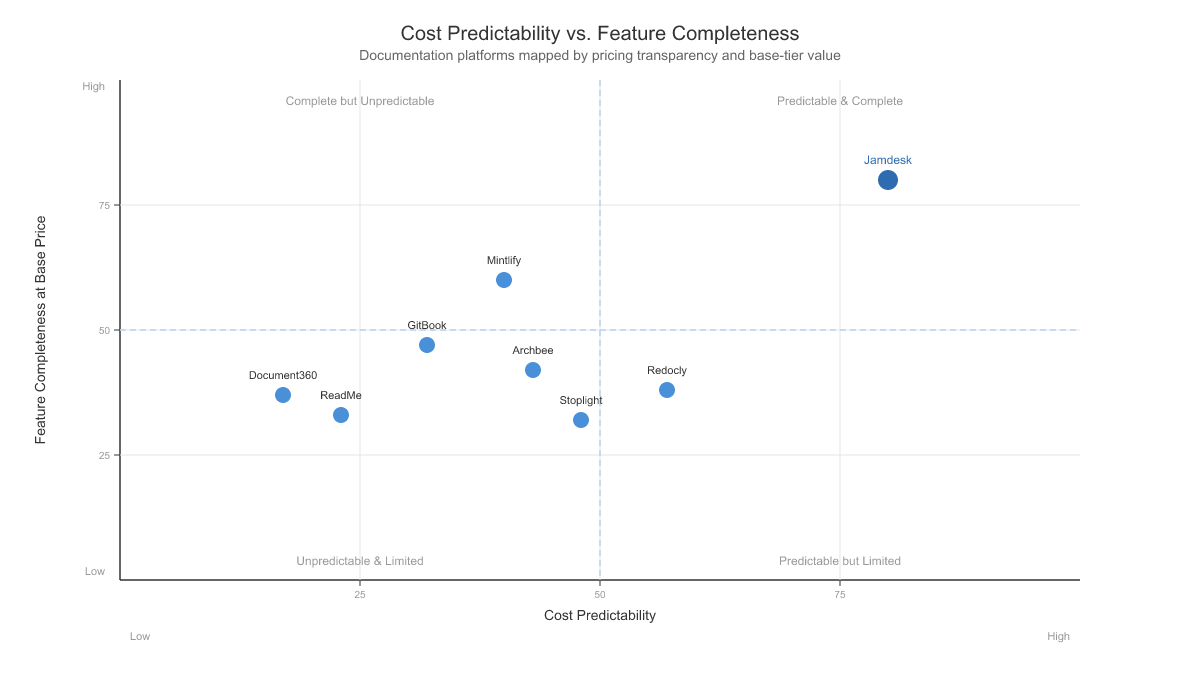
Across the eight platforms analyzed, we identified four distinct pricing models. Understanding which model a vendor uses is essential for forecasting costs accurately, because the same nominal monthly price will produce vastly different twelve-month totals depending on how the model scales with team size and feature requirements.
Flat rate pricing charges a single monthly fee for a core configuration regardless of usage. Jamdesk is the clearest example. The Pro plan costs $29 per month and includes one documentation project with unlimited team members, no AI usage fees or caps, and no feature gating across analytics, branding removal, or custom domains [2]. Extra projects are priced as linear add-ons rather than as tier upgrades. This model offers strong budget predictability for small teams but is uncommon in the current market.
Tiered feature gating uses multiple plan levels where specific features are available only at higher price points. ReadMe and Mintlify both employ this approach. ReadMe's free Starter tier provides basic documentation hosting with lightweight AI features, but branding removal, branching, reviews, and custom MDX require the Pro tier at $300 per month on monthly billing ($250 per month on annual billing), and the full Ask AI agent requires an additional $150 per month add-on [4]. Mintlify's free Starter tier includes no AI credit allocation. Accessing the AI assistant requires jumping to the $540 per month Pro plan (monthly billing) with no intermediate option [14]. The risk with tiered gating is that teams sign up for an affordable entry tier, then find within months that the features they need sit one or two tiers higher.
Per-seat plus per-site stacking multiplies costs across two independent dimensions. GitBook is the primary example: teams must purchase both a Site Plan (ranging from free to $299 per site per month on monthly billing [15]) and a User Plan ($15 per user per month [16]). A three-person team running one Premium site with user seats pays $79 plus three times $15, or $124 per month. If that team needs branding removal (available only on the Ultimate site plan at $299 per month), the cost jumps to $344 per month for a single site [15]. Adding a second site doubles the site plan component.
Per-user pricing scales linearly with team size. Redocly and Stoplight both follow this model, though with different base structures. Redocly's Pro plan charges $28 per user per month on monthly billing [17], while Stoplight bundles a set number of users into each tier and charges $14 to $27 per additional user depending on the plan [18]. Per-user pricing is transparent and predictable for small teams, but costs escalate as organizations grow.
| Platform | Pricing Model | Monthly Billing Price | Key Cost Multiplier |
|---|---|---|---|
| Jamdesk | Flat rate | $29/mo [2] | Extra project $15/mo; unlimited team members included |
| Mintlify | Tiered feature gating + metered AI | $540/mo Pro [14] | AI credits: 10,000/mo included, then $0.01/credit. No per-seat fees |
| GitBook | Per-seat + per-site stacking | $79 to $299/site/mo [15] | + $15/user/mo [16] |
| ReadMe | Tiered feature gating + add-ons | $300/mo Pro [4] | Ask AI $150/mo. Dashboard $100/mo |
| Redocly | Per-user | $28/user/mo Pro [17] | $66/user/mo Enterprise |
| Stoplight | Per-user (bundled tiers) | $56 to $453/mo [18] | Extra seats $14 to $27/user/mo |
| Document360 | Quote-based (opaque) | Not published [7] | Unknown, requires sales engagement |
| Archbee | Tiered + per-contributor | $100 to $400/mo [20] | Add-ons: AI $20/mo, Analytics $80/mo [22] |
Platform-by-Platform Pricing Analysis
Jamdesk
Jamdesk uses a flat-rate pricing model built around a single documentation project and unlimited team members. The Pro plan costs $29 per month and includes AI-powered chat and search, analytics with geographic heatmaps, white labeling with complete branding removal, custom domain with SSL provisioning, over 25 MDX components, OpenAPI specification support, automatic llms.txt generation, custom CSS injection, full API access, syntax highlighting for more than 100 languages, password protection for docs, and priority support [2]. There are no AI usage caps and no analytics add-ons to purchase separately. Team members are unlimited at no extra charge, and additional documentation projects are $15 per month each. A 14-day free trial is available.
| Tier | Monthly Price | What You Get |
|---|---|---|
| Free Trial | $0 (14 days) | Full platform access |
| Pro | $29/mo | Core features, 1 project, unlimited team members, unlimited AI usage (extra project $15/mo) |
| Pro (Annual) | ~$24/mo | 17% discount on annual billing |
| Enterprise | Custom | SSO/SAML, multiple sites, dedicated account manager, SLA |
The unlimited-seat policy is worth examining. On most competing platforms, adding a fifth or tenth editor triggers a tier-level cost increase, often $15 to $20 per user per month. Jamdesk charges nothing per seat. A solo developer and a thirty-person team pay the same $29 per month for the Pro plan [2]. This makes budgeting straightforward: the line item stays flat no matter how many editors join.
AI capabilities highlight another structural difference. Where competitors meter AI interactions (charging per message after a monthly cap or locking AI features behind premium add-ons), Jamdesk bundles AI chat and AI-powered search into the base plan with no usage ceiling [2]. A team fielding 1,000 AI queries per month on a metered platform faces hundreds of dollars in overage charges. On Jamdesk, that same usage adds nothing beyond the $29 base.
Analytics follow the same pattern. Geographic heatmaps, page-level engagement data, and search analytics are part of the Pro plan [2]. Competitors frequently reserve analytics for business or enterprise tiers.
The Enterprise tier adds SSO and SAML authentication, the ability to manage multiple documentation sites under one account, a dedicated account manager, and a guaranteed SLA [2]. Pricing is custom and negotiated directly.
Annual billing reduces the effective monthly cost by 17 percent, bringing the Pro plan to approximately $24.17 per month [2]. Over twelve months, that totals $290.
Mintlify
Mintlify has built a polished documentation platform with strong developer experience, but a pricing gap affects purchasing decisions for growing teams. The plan lineup: Starter (free), Pro ($540 per month on monthly billing, $450 per month on annual billing), and Enterprise (custom pricing) [14]. There is nothing between $0 and $540. The moment a team outgrows the Starter plan's constraints, the cost jumps by $540 per month.
| Tier | Monthly Billing | Annual Billing | Workspace Members | AI Credits |
|---|---|---|---|---|
| Starter | $0 | $0 | 5 max | None included |
| Pro | $540/mo | $450/mo | No per-seat pricing | 10,000/mo (then $0.01/credit) |
| Enterprise | Custom | Custom | Custom | Custom |
The Starter plan caps the workspace at five members, includes no AI credit allocation, and does not include preview deployments [14]. For a solo developer or a very small team experimenting with the platform, these limitations are manageable. But the moment a sixth person needs workspace access, or the team wants the AI assistant, the only option is the Pro plan at $540 per month (monthly billing).
Pro includes preview deployments, platform analytics, password protection for documentation sites, and grammar and spelling checks [14]. The AI assistant and writing agent activate at this tier, metered in credits: 10,000 credits per month are included, and each additional credit costs $0.01 [14]. Mintlify no longer charges per editor seat; the Pro price is flat regardless of team size [14].
The credit meter deserves scrutiny. 10,000 credits per month sounds generous in the abstract, but the assistant, the writing agent, and automations all draw down the same pool, and agent-heavy workflows burn through it quickly. Every credit beyond the allocation costs $0.01, so a team that runs 25,000 credits in a month pays $540 for the Pro base plus $150 in overage, totaling $690 per month [14]. Even without overage, twelve months of Pro on monthly billing comes to $6,480.
GitBook
GitBook's pricing model is among the most complex in the space. Buyers must combine two separate plan types: a Site Plan that governs what the published documentation site does, and a User Plan that governs what each team member does within the editor [15][16]. Many prospective buyers evaluating GitBook's pricing page for the first time miss this dual-plan structure, leading to cost surprises when the invoice arrives.
| Plan Type | Tier | Monthly Billing | What Does This Control |
|---|---|---|---|
| Site Plan | Free | $0 | gitbook.io subdomain only |
| Premium | $79/site/mo | Custom domain, AI search, analytics, PDF exports | |
| Ultimate | $299/site/mo | Site sections, cross-doc search, visitor auth, logo removal | |
| User Plan | Paid | $15/user/mo | Team collaboration, permissions, AI writing/editing |
Annual billing reduces site plans to $65 (Premium) and $249 (Ultimate) per site per month, and user plans to $12 per user per month [15][16].
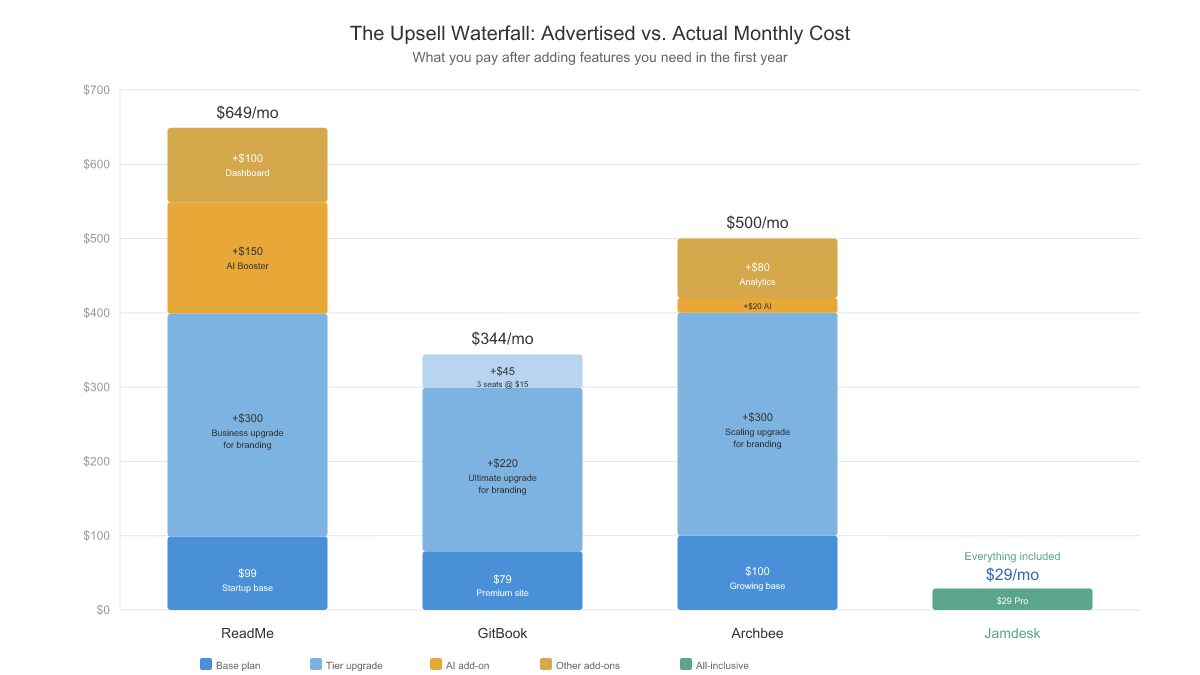
The stacking effect drives cost escalation. A three-person team that needs AI-powered search on their documentation site pays the Premium Site Plan ($79 per month) plus three User Plans (3 times $15, or $45 per month), totaling $124 per month for a single documentation site [15][16]. That figure is competitive until the team needs branding removal. Removing the GitBook logo requires the Ultimate Site Plan at $299 per month, which pushes the same three-person team to $344 per month [15].
Multi-site deployments amplify the cost further. An organization maintaining five documentation sites at the Ultimate tier with thirty users would pay $299 times five sites plus $450 in user fees, totaling $1,945 per month [15][16]. Each additional site adds another $299 per month at the Ultimate tier.
The dual-plan structure introduces cognitive overhead during the evaluation process and creates scenarios where a buyer must upgrade two separate plan dimensions simultaneously to access a single feature. AI search requires a Premium or Ultimate Site Plan, while AI editing requires a paid User Plan [15][16]. A team wanting both AI capabilities must pay for upgrades on both axes.
ReadMe
ReadMe positions itself as a developer hub platform, combining API documentation with developer analytics and interactive API exploration. The pricing structure layers a three-tier plan system (Starter, Pro, Enterprise) on top of two significant add-ons, creating a model where the advertised tier price often represents only a fraction of the total monthly cost [4].
| Tier | Monthly Billing | Annual Billing | Key Additions Over Previous Tier |
|---|---|---|---|
| Starter | $0 | $0 | Custom domain, bidirectional sync, interactive API reference, markdown editor, AI Dropdown, LLMs.txt, MCP Server |
| Pro | $300/mo | $250/mo | Remove ReadMe logo, invite teammates, branching and reviews, private docs, landing page, changelog, custom MDX components, reusable content, CSS/HTML, Ask AI Lite, Agent Owlbert, AI Doc Linting |
| Enterprise | Custom | $3,000+/mo | Multiple combined projects, user roles and access control, SSO/OAuth, audit logs, dedicated support, Docs Audit, global lint rules |
| Add-On | Monthly Price | What Does This Include |
|---|---|---|
| Ask AI | $150/mo | Full Ask AI agent on top of the Ask AI Lite included with Pro, plus AI analytics and model selection |
| Developer Dashboard | $100/mo base | 5M API logs included, then $10 per additional 1M logs |
Branding removal is available starting on the Pro tier at $300 per month on monthly billing ($250 per month on annual billing) [4]. This is a $300 per month jump from the free Starter tier. For many teams, the primary driver for upgrading is simply the need to remove ReadMe's logo and unlock branching, reviews, and custom MDX components.
The add-on layer adds further cost. The Ask AI add-on at $150 per month unlocks the full Ask AI agent on top of the Ask AI Lite included with Pro, plus AI analytics and model selection [4]. The Developer Dashboard adds $100 per month for API log analytics [4].
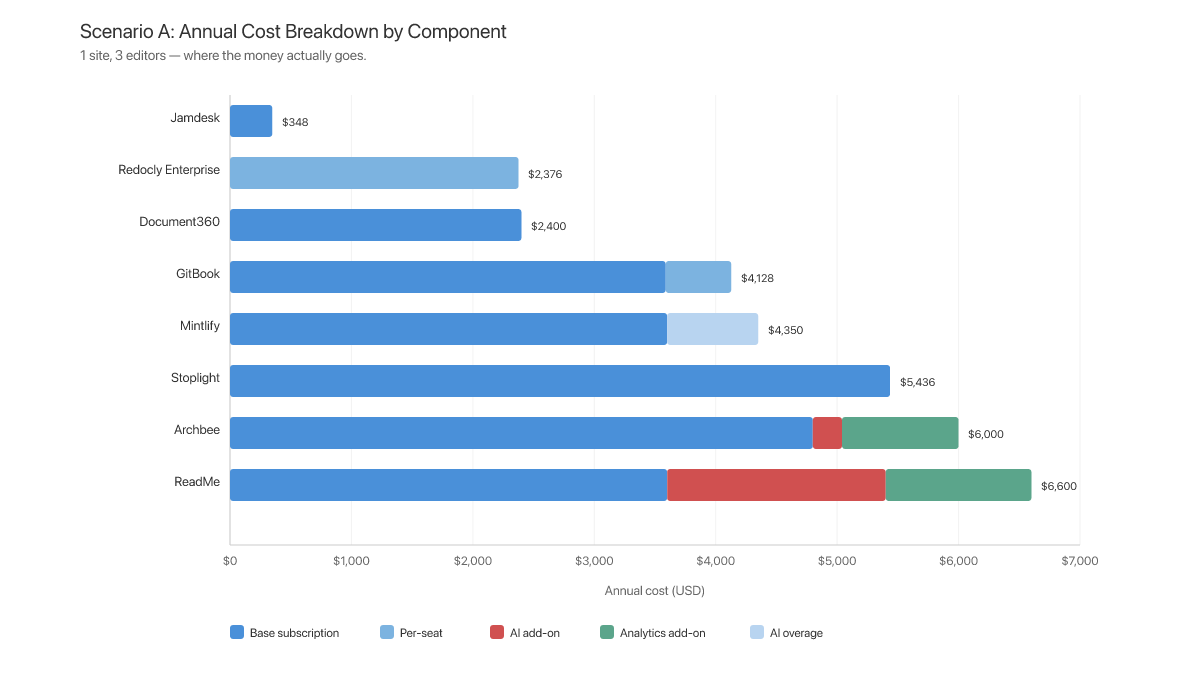
The compounding effect: a team that needs branding removal, the full Ask AI agent, and developer analytics pays $300 for Pro, $150 for Ask AI, and $100 for Developer Dashboard, totaling $550 per month on monthly billing [4]. Over twelve months, that amounts to $6,600 annually.
Redocly
Redocly has built its reputation on an OpenAPI-first philosophy, using the popular open-source Redoc renderer as the foundation for a commercial documentation platform. The pricing is per-seat with the full "Realm" product suite (Redoc, Revel, Reef) [17].
| Tier | Monthly Billing | Annual Billing | Includes |
|---|---|---|---|
| Pro | $28/seat/mo | ~$25/seat/mo | 1 project, 100 pages, custom domain, "Try It" API console |
| Enterprise | $66/seat/mo | ~$58/seat/mo | 500 pages, SSO, guest SSO, RBAC, AI search, remote content |
| Enterprise+ | Custom (yearly only) | Custom | Data residency, procurement forms, security questionnaires |
For a three-person team on the Pro tier, the monthly cost comes to $84 on monthly billing [17]. At the Enterprise level with AI search and SSO, the same team pays $198 per month. The per-user model means costs scale linearly and predictably with team size.
The trade-off is scope. Redocly is fundamentally an API reference rendering tool, and while the rendering quality is strong, the platform has limitations as a full documentation solution. The Pro tier lacks AI search capabilities and branding removal options. Teams needing those features must move to the Enterprise tier at $66 per seat per month [17].
Stoplight
Stoplight approaches documentation from the API design side of the workflow, positioning itself primarily as an API design and governance tool with documentation publishing as a secondary capability [18].
| Tier | Monthly Billing | Annual Billing | Included Users | Extra Seat (Monthly) |
|---|---|---|---|---|
| Free | $0 | $0 | 1 | N/A |
| Basic | $56/mo | $44/mo | 3 | $14/mo |
| Startup | $147/mo | $113/mo | 8 | $14/mo |
| Pro Team | $453/mo | $362/mo | 15 | $27/mo |
| Enterprise | Custom | Custom | Unlimited | Custom |
Branding removal is only available on the Pro Team tier at $453 per month on monthly billing [18]. SSO is similarly gated to Pro Team. A three-person team on the Basic plan pays $56 per month, but that configuration lacks custom domains, branding control, and SSO [18]. Accessing those features requires the Pro Team plan at $453 per month, a more than eight-fold increase.
The platform's strength lies in API design governance: style guides, linting rules, and collaborative design review [18]. Teams evaluating Stoplight purely as a documentation platform should weigh whether the design-centric feature set justifies the cost.
Document360
Document360 presents a pricing challenge distinct from every other platform in this analysis: since late 2024, the company has removed all public pricing from its website, requiring prospective customers to request a quote for any of its three tiers [7].
| Tier | Public Price | Key Features |
|---|---|---|
| Professional | Quote required (est. $150+/mo) | Knowledge base, custom domain, API docs, 50+ language translation, Eddy AI agent |
| Business | Quote required | Workflow builder, embedded help center, analytics, 30+ integrations, AI search |
| Enterprise | Quote required | SSO, decision trees, testing environment, audit trail, priority support |
Based on industry reports and third-party review sites, the starting price is estimated at $150 or more per month for the Professional tier [21]. The absence of transparent pricing is a meaningful data point. Quote-based pricing typically signals that the vendor prices based on perceived willingness to pay rather than a standardized rate card [7].
Document360's architecture is oriented toward knowledge bases rather than the docs-as-code workflow preferred by most engineering teams. Content is managed through a web-based editor rather than through Git repositories and Markdown files [7].
Archbee
Archbee positions itself as a documentation platform that balances accessibility at the entry level with comprehensive features at higher tiers [20].
| Tier | Monthly Billing | Annual Billing | Key Features |
|---|---|---|---|
| Growing | $100/mo | $80/mo | Unlimited readers, unlimited spaces, custom domain, basic branding, API docs, GitHub integration |
| Scaling | $400/mo | $350/mo | Full branding control, review system, reusable content, versioning, localization, advanced access control |
| Enterprise | Custom | Custom | All add-ons, multi-team/org, SAML/OIDC SSO, priority support, onboarding |
| Add-On | Monthly Price |
|---|---|
| AI Write Assist and AI Q&A | $20/mo [22] |
| Insights (analytics) | $80/mo [22] |
The jump from $100 to $400 on monthly billing deserves attention. Features that many teams consider essential (full branding control, content versioning, and localization) are gated behind the Scaling tier, creating a 4x cost increase when a team outgrows the Growing plan [20]. The add-on layer adds further cost: AI writing assistance and question answering costs $20 per month, while the Insights analytics dashboard costs $80 per month [22]. A team on the Growing plan needing AI and analytics pays $100 plus $20 plus $80 = $200 per month before any per-contributor charges.
Archbee offers a startup program providing a 50 percent discount for two years [20]. For qualifying startups, the Growing tier drops to $50 per month (monthly billing) and the Scaling tier to $200 per month.
Real-World Pricing Scenarios
Pricing pages tell you what a platform charges. They do not tell you what a team actually pays. This section constructs two scenarios and calculates the actual twelve-month cost for each of the eight platforms using monthly billing rates. Both scenarios assume the team needs a custom domain, AI-powered chat or search, analytics, OpenAPI support, and branding removal. AI usage is estimated at moderate levels: roughly five to seven queries per user per business day.
Scenario A: Small Startup, 1 Documentation Site, 3 Editors
This scenario represents a typical early-stage team: three editors collaborating on a single documentation site. Monthly AI usage is estimated at 500 messages.
Jamdesk remains at $29 per month. Three editors fit within the ten-member allocation with no per-seat charges, and there are no AI caps, analytics add-ons, or branding-removal upcharges [2]. Total: $29 per month.
Mintlify requires the Pro plan at $540 per month (monthly billing): platform analytics live on Pro, and the AI assistant draws on Pro's included 10,000 monthly credits [14]. The three editors add nothing, since Mintlify no longer charges per seat. Note that white labeling sits on the Enterprise tier, so full branding removal requires a custom quote on top [14]. Total: $540 per month.
GitBook requires the Ultimate site plan at $299 per month for branding removal, plus three user plans at $15 each [15][16]. Total: $344 per month.
ReadMe requires the Pro tier at $300 per month for branding removal (monthly billing), plus the Ask AI add-on ($150/mo) and the Developer Dashboard ($100/mo) [4]. Total: $550 per month.
Redocly at Enterprise tier (required for AI search): 3 users at $66 each [17]. Total: $198 per month. Note: Redocly is focused on API reference rendering and is more limited as a full documentation platform.
Stoplight requires Pro Team at $453 per month (monthly billing) for branding removal [18]. Total: $453 per month.
Document360 requires a sales conversation. Estimated: ~$200 per month [21].
Archbee requires the Scaling tier at $400 per month (monthly billing) for branding control, plus the AI add-on ($20/mo) and Insights add-on ($80/mo) [20][22]. Total: $500 per month.
Scenario A: 12-Month Cost Summary (Monthly Billing)
| Platform | Monthly Cost | 12-Month Total | Source |
|---|---|---|---|
| Jamdesk | $29 | $348 | [2] |
| Redocly (Enterprise) | $198 | $2,376 | [17] |
| Document360 (est.) | ~$200 | ~$2,400 | [21] |
| GitBook (Ultimate + 3 users) | $344 | $4,128 | [15][16] |
| Stoplight (Pro Team) | $453 | $5,436 | [18] |
| Archbee (Scaling + add-ons) | $500 | $6,000 | [20][22] |
| Mintlify (Pro) | $540 | $6,480 | [14] |
| ReadMe (Pro + add-ons) | $550 | $6,600 | [4] |
Scenario B: Scaling Organization, 5 Documentation Sites, 30 Editors
This scenario represents a growing company managing documentation across multiple products: five documentation sites with thirty editors. Monthly AI usage is estimated at 3,000 messages total. SSO is assumed to be required at this organizational scale.
Jamdesk can handle five documentation sites on Pro by adding four extra projects at $15 per month each, and thirty editors at no additional cost, since team members are unlimited on every plan: $29 + $60 = $89 per month, or $1,068 per year [2]. Organizations that require SSO, SAML, multi-team governance, or a dedicated account manager would move to the Enterprise plan with custom pricing [2].
Mintlify requires separate Pro subscriptions per site. Five instances at $540 each = $2,700 per month [14]. The thirty editors add nothing, since Mintlify no longer charges per seat [14]. AI usage draws on each instance's included 10,000 monthly credits (50,000 total), with overage billed at $0.01 per credit [14]. SSO requires Enterprise (additional cost). Total without SSO: $2,700 per month.
GitBook requires five Ultimate site plans: 5 times $299 = $1,495 [15]. Thirty user plans: 30 times $15 = $450 [16]. Total: $1,945 per month.
ReadMe requires Enterprise for multi-project support and SSO, starting at $3,000+ per month on annual billing [4]. Monthly billing would be higher. Adding Ask AI ($150) and the Developer Dashboard ($100): $3,250+ per month [4].
Redocly at Enterprise: 30 users at $66 each = $1,980, plus additional projects at ~$49 each for 4 extra = $196 [17]. Total: $2,176 per month.
Stoplight Pro Team at $453 (monthly billing) includes fifteen seats [18]. Fifteen extra seats at $27 each = $405 [18]. Total: $858 per month. Multi-site support is unclear and may require Enterprise.
Document360 requires Enterprise for SSO and multi-project. Estimated: ~$500 per month [21].
Archbee requires Enterprise for multi-team and SSO [20]. Custom pricing. Estimated: ~$700+ per month based on Scaling tier baseline and contributor scaling [20].
Scenario B: 12-Month Cost Summary (Monthly Billing)
| Platform | Monthly Cost | 12-Month Total | Source | Notes |
|---|---|---|---|---|
| Jamdesk (Pro + extras) | $89 | $1,068 | [2] | Or Enterprise for SSO/SAML and multi-team governance |
| Document360 (est.) | ~$500 | ~$6,000 | [21] | Enterprise quote required |
| Archbee (est.) | ~$700+ | ~$8,400+ | [20] | Enterprise quote required |
| Stoplight | $858 | $10,296 | [18] | Multi-site support unclear |
| GitBook | $1,945 | $23,340 | [15][16] | SSO available on higher user tiers |
| Redocly | $2,176 | $26,112 | [17] | Limited full-docs capability |
| Mintlify | $2,700 | $32,400 | [14] | SSO requires Enterprise (add'l cost) |
| ReadMe | $3,250+ | $39,000+ | [4] | Enterprise required for SSO + multi-project |
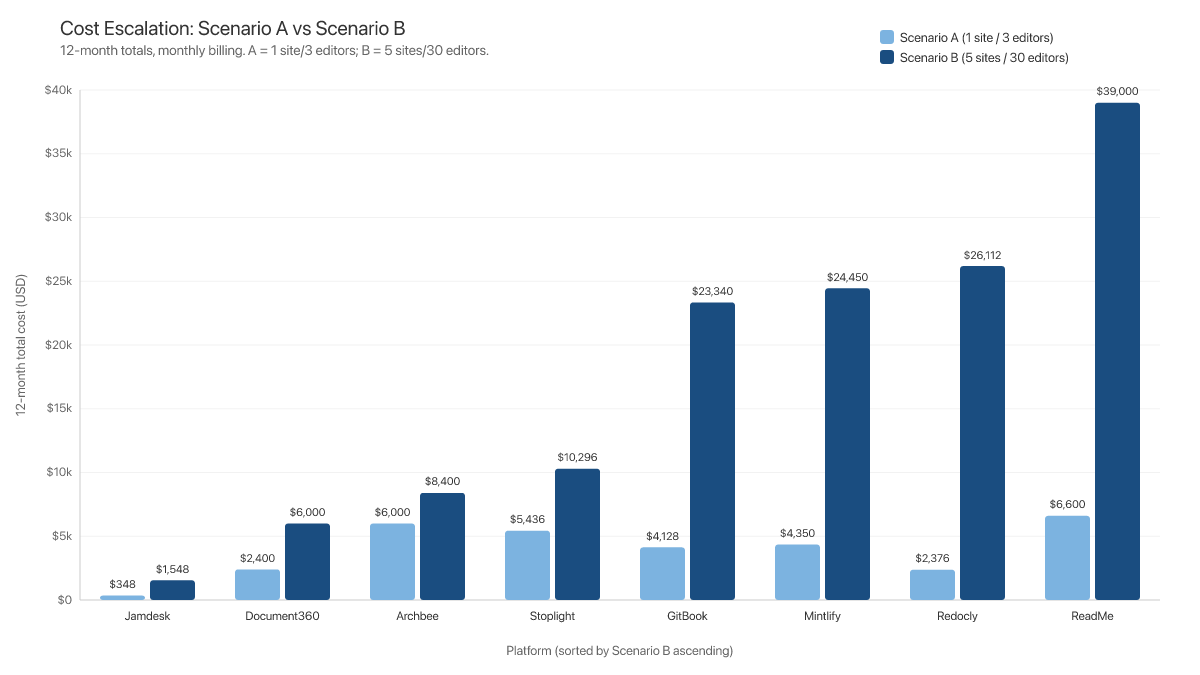
The cost spread at the thirty-person, five-site level is dramatic. GitBook at $23,340 per year and ReadMe at $39,000+ per year represent significant annual commitments for documentation infrastructure alone [15][4].
Common Pricing Patterns to Watch
Documentation platform pricing in 2026 follows a familiar SaaS pattern: the advertised price gets you in the door, and the features you need are behind the next door, and the one after that. Understanding these gating patterns is essential for any team conducting a pricing evaluation.
AI gating. In 2026, AI-powered chat and search are baseline expectations for documentation [13]. Yet most platforms either exclude AI from base plans or impose usage caps. Mintlify meters AI in credits: the $540/mo Pro plan includes 10,000 credits per month, then $0.01 per credit [14]. ReadMe reserves the full Ask AI agent for a $150/mo add-on [4]. GitBook splits AI across both plan axes: AI search requires a Premium site plan ($79/mo), while AI writing requires a paid user plan ($15/user/mo) [15][16].
Analytics gating. You cannot improve documentation you cannot measure. ReadMe's Developer Dashboard is a $100/mo add-on [4]. Archbee charges $80/mo for Insights analytics [22]. Stoplight does not offer documentation analytics as a standalone capability [18].
Branding gating. Removing a vendor's logo costs the vendor nothing to provide, yet frequently requires a tier upgrade of $200 or more per month. GitBook requires the Ultimate site plan at $299/site/mo [15]. ReadMe requires Pro at $300/mo [4]. Archbee requires Scaling at $400/mo [20]. Stoplight requires Pro Team at $453/mo [18].
The per-seat surprise. GitBook charges $15 per user per month on top of per-site fees [15][16]. Mintlify dropped per-seat pricing in mid-2026, shifting the meter to AI credits instead [14]. A team that budgeted $79 per month for GitBook's Premium plan is actually paying $124 per month once three editors are added, and $344 per month once branding removal is factored in.
Add-on stacking. ReadMe's free Starter tier transforms into a $550 per month commitment once branding removal, the full Ask AI agent, and developer analytics are stacked on top of Pro ($300 + $150 + $100) [4]. Each add-on is individually justified, but the cumulative effect is a monthly cost that bears little resemblance to the Starter tier's headline.
Hidden pricing. Document360 removed all public pricing in late 2024 [7]. When a vendor will not tell you what the platform costs, the negotiation dynamic shifts in the vendor's favor.
Dual-plan confusion. GitBook's requirement for separate Site Plans and User Plans creates confusion that goes beyond upselling [15][16]. A buyer who sees "$79 per month" on the pricing page may not realize that the $79 covers only site-level features and that each editor requires a separate $15/mo user plan.
The modular add-on pattern. Some platforms use a base plan that appears cost-effective while selling essential capabilities as individual add-ons. Archbee's Growing tier at $100 per month (monthly billing) looks reasonable until a team realizes that AI question answering costs an additional $20 per month and analytics costs another $80 per month [22]. A team that budgeted $100 per month for documentation is actually paying $200 per month.
The contributor model mismatch. High-growth teams often face what you might call the "Hybrid Team Problem." Engineers prefer docs-as-code workflows (Markdown, Git, CLI) while non-technical contributors from Product, Support, and Marketing need visual editors. Platforms that only support one model force teams to choose between engineering workflow efficiency and cross-functional contribution. Platforms that resolve this through bidirectional Git sync, where engineers work in their IDEs and non-technical staff use a visual interface while both update the same underlying source, deliver the most sustainable collaboration model. GitBook's bidirectional sync and Jamdesk's Git-based workflow both address this, though at different price points [15][2].
Buyer's Checklist
Selecting a documentation platform is a multi-year commitment with switching costs that increase over time. The following checklist surfaces the questions that pricing pages frequently obscure.
- Is AI chat included or an add-on, and what are the usage limits? AI-powered search and chat are baseline expectations in 2026 [13]. Confirm whether AI is included, whether usage is metered, and what the overage charge is. Metered allocations exhaust quickly at moderate usage: Mintlify's Pro plan includes 10,000 AI credits per month and bills $0.01 per credit beyond that [14].
- Are analytics included or gated behind a higher tier? Documentation analytics are essential for identifying gaps. If analytics require a tier upgrade or add-on, factor that cost into your baseline.
- Will you be able to remove vendor branding on your current plan? Many platforms require a $200 to $400 per month tier upgrade solely for branding removal (white-labeling) [15][4][20]. The branding-removal tier is your real starting price.
- What is the per-seat cost, and is there a seat cap? Per-seat pricing will double or triple the base cost as a team grows [14][16]. Calculate costs for your current team size and your projected size in twelve months.
- If you need multiple documentation sites, does pricing multiply per site? Some platforms charge per site in addition to per user [15]. Confirm whether a second site requires a second subscription.
- Is the published price monthly or annual-only? Several platforms display annual billing rates prominently while burying the monthly rate [18][14][20]. A platform advertising $44/mo on annual billing actually costs $56/mo on monthly billing, a 27 percent difference. Always compare monthly billing rates for an apples-to-apples evaluation.
- Are there usage-based charges for API logs, AI messages, or page views? ReadMe charges for API log volume [4]. Mintlify charges per AI message beyond the cap [14]. These variable costs are the hardest to predict and the most likely to generate surprises.
- Does the platform support your workflow, Git-based, WYSIWYG, or both? Some platforms are exclusively Git-based. Others provide only a WYSIWYG editor [2][15][7]. Evaluate whether your team works within the platform's authoring model.
- Will you be able to migrate away easily, or is content locked in a proprietary format? Platforms using standard Markdown or MDX files in Git repositories offer the most portability [19]. Ask how content is stored and whether you are able to export in a standard format.
- Does the platform generate llms.txt for AI-agent readability? As AI agents increasingly consume documentation, llms.txt support ensures your docs remain accessible to both human readers and AI tools [2][4][23].
- Does the platform support Model Context Protocol (MCP)? MCP is an emerging live connection protocol that exposes documentation as a real-time data source for AI tools during active coding sessions. Platforms with MCP support allow developers' AI assistants to query your documentation directly, reducing hallucinations and improving the accuracy of AI-generated code that depends on your API [2][4][14].
- Does the platform automatically sync with your code repository to prevent Knowledge Drift? When documentation and code diverge, AI assistants produce incorrect answers that users attribute to your product, not to the AI. Platforms that offer bidirectional Git sync or automated codebase monitoring reduce this risk. Ask whether the sync is real-time, whether the sync supports branching workflows, and whether non-technical contributors are able to participate without breaking the sync [15][2].
What the Data Shows
The central finding of this analysis: the gap between a platform's advertised price and what a team actually pays is the defining problem in documentation platform pricing today. A platform that advertises $79 per month costs $344 per month once branding removal and per-seat charges are applied [15][16]. A platform with a $300 per month Pro tier reaches $550 per month with necessary add-ons [4]. A free platform ships without AI search, analytics, or support, leaving teams to fill those gaps on their own [19]. These are not edge cases. They are the standard experience for teams that move beyond the most basic tier.
Teams that select a documentation platform based on the free or entry-level tier often face a reckoning six to twelve months later. The documentation is live, users depend on the site, search engines have indexed the content, and internal workflows have been built around the platform. The cost of migrating is measured in engineering hours, disrupted user experience, and lost search equity. Most teams absorb the price increase rather than migrate, which is the dynamic that tiered pricing is designed to create.
Flat-rate pricing eliminates this dynamic. When every feature is included at one price, there is no upsell path, no overage surprise, and no budget approval required when the team needs analytics or AI capabilities. Per-seat and per-site models offer predictability in a different form, with costs that scale linearly but at least transparently. Quote-based models offer the least visibility.
Documentation in 2026 functions as AI infrastructure, a dataset that determines whether AI assistants accurately represent your product. Interactive API references and automated OpenAPI synchronization allow developers to reach their first successful API call in minutes rather than hours. AI-powered self-service deflects support tickets. And as AI assistants become a primary interface through which developers evaluate and adopt software, structured documentation with llms.txt and MCP support ensures your product is correctly indexed and represented.
When evaluating platforms, model costs based on the feature set you will need in twelve months, not the feature set you need today. Calculate per-seat costs at your projected team size. Estimate AI usage based on realistic query volumes. Confirm that branding removal and analytics are included at the tier you plan to purchase. And always compare monthly billing rates, because the annual discount should not obscure the true list price.
Documentation Feature Comparison Table
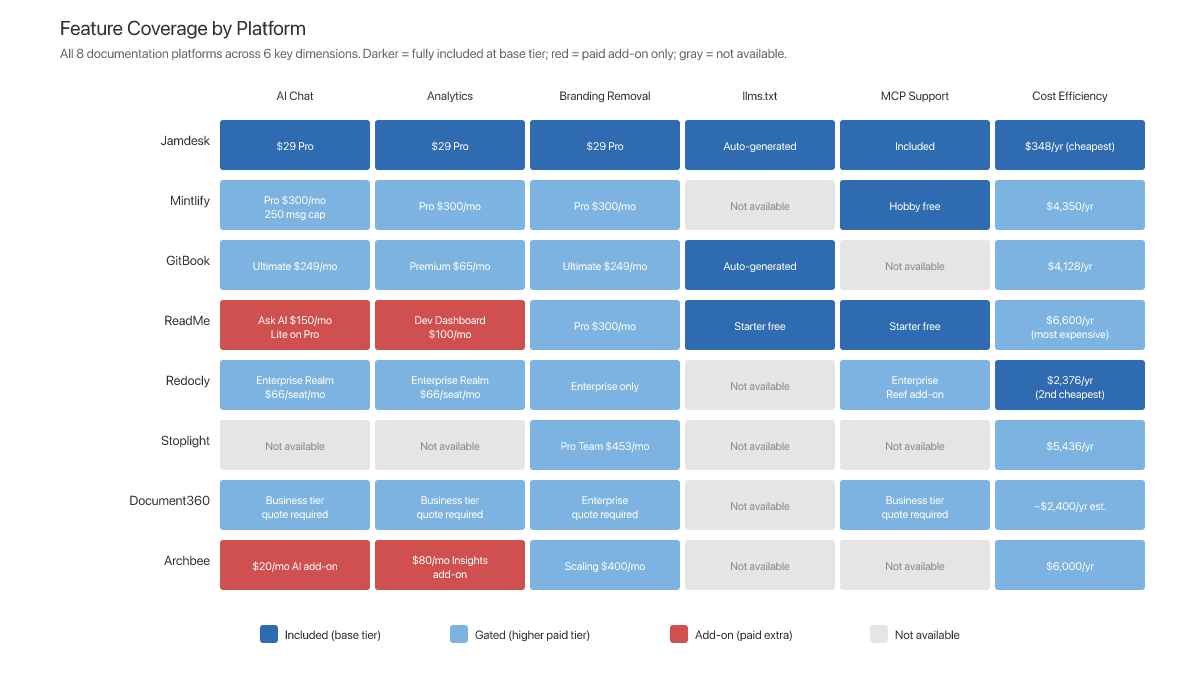
All documentation tool prices reflect monthly billing rates. Where a feature is gated behind a specific tier, the required tier and monthly billing cost are noted.
| Feature | Jamdesk | Mintlify | GitBook | ReadMe | Redocly | Stoplight | Document360 | Archbee |
|---|---|---|---|---|---|---|---|---|
| AI Chat/Search | Included ($29/mo) [2] | Pro ($540/mo), 10k credits/mo then $0.01/credit [14] | Premium site ($79/mo) + user plan ($15/user/mo) [15][16] | Ask AI Lite on Pro. Full Ask AI = $150/mo add-on [4] | Enterprise ($66/user/mo) [17] | Not available [18] | Eddy AI (quote required) [7] | $20/mo add-on [22] |
| Built-in Analytics | Included ($29/mo) [2] | Pro only ($540/mo) [14] | Premium site ($79/mo) [15] | $100/mo add-on [4] | Enterprise ($66/user/mo) [17] | Not available [18] | Business tier (quote) [7] | $80/mo add-on [22] |
| Branding Removal | Included ($29/mo) [2] | Enterprise (custom) [14] | Ultimate site ($299/site/mo) [15] | Pro ($300/mo) [4] | Not on Pro [17] | Pro Team ($453/mo) [18] | Quote required [7] | Scaling ($400/mo) [20] |
| Custom Domain | Included ($29/mo) [2] | All tiers [14] | Premium site ($79/site/mo) [15] | Starter (free) [4] | Pro ($28/user/mo) [17] | Startup ($147/mo) [18] | Quote required [7] | Growing ($100/mo) [20] |
| Per-Seat Cost | Unlimited members included [2] | None; flat plan pricing [14] | $15/user/mo [16] | Included per tier [4] | $28 to $66/user/mo [17] | $14 to $27/seat [18] | Quote required [7] | Per-contributor [20] |
| OpenAPI Support | Included [2] | All tiers [14] | Included [15] | All tiers [4] | Core feature [17] | Core feature [18] | Included [7] | Included [20] |
| llms.txt | Auto-generated [2] | Not available [14] | Auto-generated (llms.txt + llms-full.txt) [23] | Included free [4] | Not available [17] | Not available [18] | Not available [7] | Not available [20] |
| MCP Support | Included [2] | Included [14] | Not available [15] | Included free [4] | Not available [17] | Not available [18] | Not available [7] | Not available [20] |
| MDX Support | 25+ components [2] | Custom components [14] | Block editor [15] | Pro ($300/mo) [4] | Markdown/MDX [17] | Stoplight Markdown [18] | Rich editor [7] | Block editor [20] |
| CLI Tools | Included [2] | Included [14] | Git Sync [15] | rdme CLI [4] | Redocly CLI [17] | Stoplight CLI [18] | Not available [7] | Not available [20] |
| Local Dev | Supported [2] | Supported [14] | Not supported [15] | Not supported [4] | Supported [17] | Supported [18] | Not supported [7] | Not supported [20] |
| Git Integration | Git-based [2] | GitHub/GitLab [14] | Git Sync [15] | Pro ($300/mo) [4] | Git-native [17] | Included [18] | Limited [7] | GitHub [20] |
| SSO/SAML | Enterprise [2] | Enterprise [14] | Higher user plan tier [16] | Enterprise ($3,000+/mo annual) [4] | Enterprise ($66/user/mo) [17] | Pro Team ($453/mo) [18] | Enterprise (quote) [7] | Enterprise [20] |
| Multiple Sites | 1 included; $15/mo per extra project [2] | Per-instance [14] | Per-site ($79 to $299/site) [15] | Enterprise ($3,000+/mo annual) [4] | ~$49/add'l project [17] | Unclear [18] | Quote required [7] | Enterprise [20] |
Endnotes
[1] Scenarios and feature assumptions defined by the authors based on common production documentation requirements.
[2] Jamdesk, "Pricing," verified March 2026, team-member pricing re-verified July 2026 (unlimited members on every plan). https://jamdesk.com/pricing and https://www.jamdesk.com/compare and best API documentation tools.
[3] Based on Scenario A comparison across all included platforms.
[4] ReadMe, "Pricing," verified April 2026. https://readme.com/pricing. Tiers: Starter (free), Pro $300/mo monthly billing ($250/mo annual), Enterprise $3,000+/mo (annual only). Add-ons: Ask AI $150/mo, Developer Dashboard $100/mo for 5M logs then $10/1M additional. ReadMe simplified its tier structure in early 2026; the older Startup and Business tiers have been consolidated into Pro.
[5] ReadMe Ask AI add-on pricing, verified April 2026. https://readme.com/pricing
[6] All pricing data verified from vendor pricing pages between March 10 and 23, 2026, and re-verified in April 2026.
[7] Document360, "Pricing," verified March 2026. https://document360.com/pricing. No public pricing displayed. Quote-based only since November 2024. Tier structure from Capterra (https://www.capterra.com/p/177031/Document360/).
[8] Methodology note: see Section "Methodology" for full scenario definitions.
[9] Docusaurus (docusaurus.io) was evaluated but excluded from this comparison. As a free open-source static site generator, it does not include AI-powered search, usage analytics, managed hosting, branding removal, or customer support, and therefore does not meet the minimum feature requirements defined in our methodology.
[10] Documentation platform market history based on publicly available sources, 2015 to 2023.
[11] Documentation platform pricing trends, 2018 to 2023.
[12] Industry analysis of AI integration in developer tools, 2024 to 2025.
[13] Stack Overflow, "2025 Developer Survey," https://survey.stackoverflow.co/2025/. See also the AI section at https://survey.stackoverflow.co/2025/ai.
[14] Mintlify, "Pricing," verified March 2026. https://mintlify.com/pricing. Re-verified July 2026 after Mintlify moved to flat-rate Pro pricing with credit-metered AI. Monthly billing: Pro $540/mo. Annual billing: Pro $450/mo. AI credits: 10,000/mo included on Pro, $0.01 per credit overage. See also Ferndesk, "Mintlify Review 2026." https://ferndesk.com/blog/mintlify-review
[15] GitBook, "Pricing" (Site Plans), verified March 2026. https://www.gitbook.com/pricing. Monthly billing: Premium $79/site/mo, Ultimate $299/site/mo. Annual billing: Premium $65/site/mo, Ultimate $249/site/mo. See also Featurebase, "GitBook Pricing 2026." https://www.featurebase.app/blog/gitbook-pricing
[16] GitBook, "Plans" (User Plans), verified March 2026. https://gitbook.com/docs/account-management/plans. Monthly billing: $15/user/mo. Annual billing: $12/user/mo.
[17] Redocly, "Pricing," verified March 2026. https://redocly.com/pricing. Monthly billing (Realm: All combined): Pro $28/seat/mo, Enterprise $66/seat/mo. Enterprise+ is custom, yearly only.
[18] Stoplight, "Pricing," verified March 2026. https://stoplight.io/pricing. Monthly billing: Basic $56/mo (3 users), Startup $147/mo (8 users), Pro Team $453/mo (15 users). Annual billing: Basic $44/mo, Startup $113/mo, Pro Team $362/mo.
[19] Docusaurus, official documentation: docusaurus.io
[20] Archbee, "Pricing," verified March 2026. https://archbee.com/pricing. Monthly billing: Growing $100/mo, Scaling $400/mo. Annual billing: Growing $80/mo, Scaling $350/mo.
[21] Document360 pricing estimates derived from Capterra (https://www.capterra.com/p/177031/Document360/), G2 (https://www.g2.com/products/document360/pricing), and Docsie comparative analysis (https://www.docsie.io/blog/articles/archbee-vs-document360-pricing-comparison-2026/).
[22] Archbee add-on pricing (AI Write Assist $20/mo, Insights analytics $80/mo) from Featurebase, "Archbee Pricing 2026: Is It Worth It?" https://www.featurebase.app/blog/archbee-pricing. Verified March 2026.
[23] GitBook, "LLM-ready docs," https://gitbook.com/docs/publishing-documentation/llm-ready-docs. Auto-generates llms.txt and llms-full.txt for all published sites. Announced January 2025: https://docs.gitbook.com/changelog/january-2025/28-january-llms.txt-support-improved-sitemapping-and-more.
All prices in this report reflect monthly billing rates unless otherwise noted. Pricing data verified between March 10 and March 23, 2026. Vendor pricing is subject to change. For the most current pricing, visit each vendor's pricing page directly. This analysis was produced by Jamdesk.