Why Google PageSpeed Actually Matters and What You Can Ignore
 Jamdesk Team
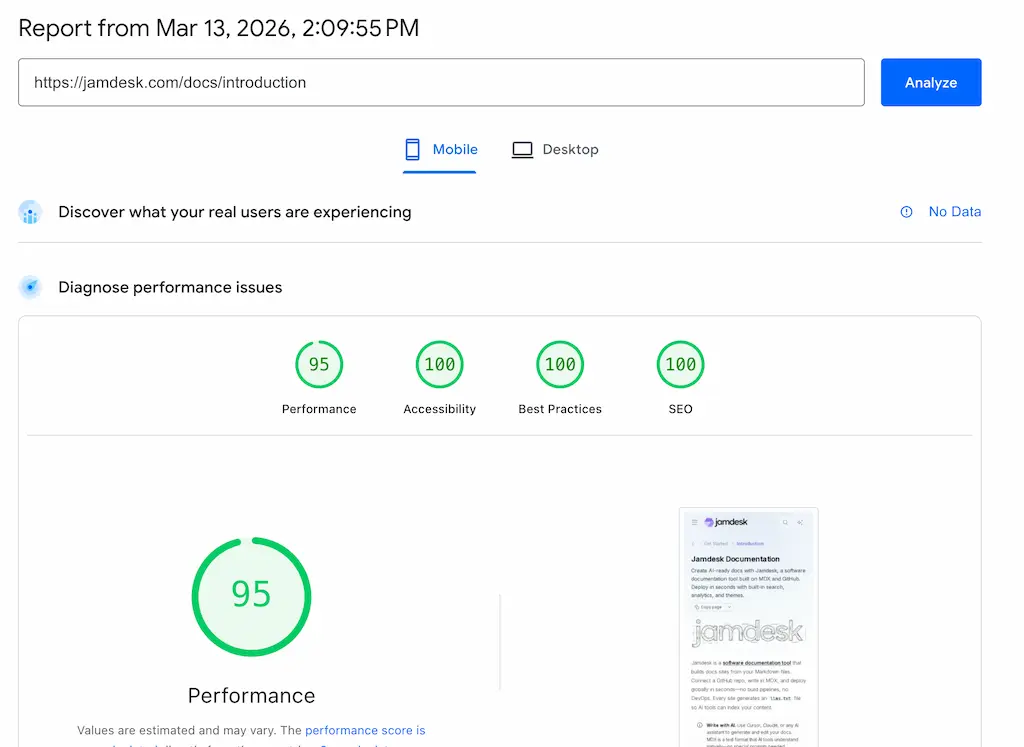
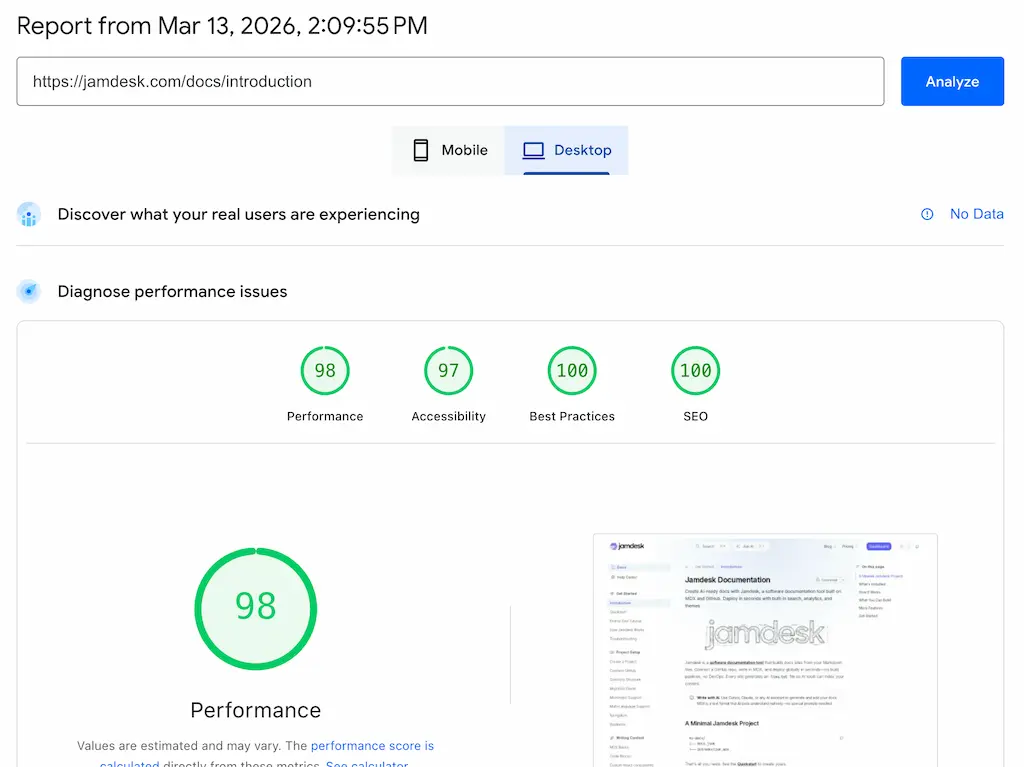
We ran Google PageSpeed Insights (Lighthouse score) on our own docs site. Mobile: 95. Desktop: 98.
We spent a lot of time making sure our software documentation tool generated super high score for our customer. It wasn't easy and took many iterations (thank you Claude Code for the assist). But was it worth it?
These measurements encompass a lot of scores, so understanding what they mean is the first step toward knowing which numbers to care about and which to ignore.
The URL we tested: jamdesk.com/docs/introduction. You can run the same test on your own site at pagespeed.web.dev right now. We'll walk through what we found, what we decided to fix, and what we decided wasn't worth the engineering time.
What Google PageSpeed Insights Actually Measures
PageSpeed gives you four scores: Performance, Accessibility, Best Practices, and SEO. Each one is a 0-100 number with a color code, like a report card. Green (90-100) means good and you rock. Orange (50-89) means needs improvement and need to work on it. Red (0-49) means poor and you suck.
Performace
Most people fixate on Performance. Fair enough, and so do we. That's the one everyone screenshots (um, see above), the one that shows up in debates about whether Lighthouse is even useful, the one your manager asks about in stand-ups when someone reads a blog post about Core Web Vitals. It's also the only score that's a weighted average of five underlying metrics rather than a simple checklist.
The weights matter because they tell you where to spend your time:
- TBT (Total Blocking Time): 30% of your score
- LCP (Largest Contentful Paint): 25%
- CLS (Cumulative Layout Shift): 25%
- FCP (First Contentful Paint): 10%
- Speed Index: 10%
TBT, LCP, and CLS account for 80% of the Performance number. FCP and Speed Index split the remaining 20%. If you're trying to improve your score, ignore FCP and Speed Index until the big three are green.
SEO
The SEO score is misleading. Our 100 doesn't mean we'll rank #1 for anything. It means Google can crawl us. The score checks for meta tags, viewport settings, crawlable links, and indexability. Passing means "we won't actively block search engines from finding you." That's a low bar. The real SEO game happens elsewhere.
Best Practices & Accessibility
Best Practices and Accessibility are genuinely useful audits for code quality and user experience. They don't affect search ranking directly. Fix the issues they flag because they matter to your users, not because Google told you to. And please don't ignore accessibility. It is important for your user both with and without disabilities.
Real-World vs Lab
One thing that trips people up: the difference between lab data and real-world field data. PageSpeed shows lab data by default. That's a simulated test run in a controlled environment. Field data comes from the Chrome User Experience Report, aggregated from real Chrome users who visit your site. Our report shows "No Data" for field data because the page doesn't have enough real-world traffic in Chrome's dataset. Many developer documentation sites will see the same thing. It doesn't indicate a problem.
The Diagnostics and Opportunities sections below the scores deserve a mention too. Those red and orange triangles ("Render blocking requests," "Reduce unused JavaScript") are suggestions, not failures. They don't directly affect your score. Developers often panic about these. Don't. Treat them as a prioritized to-do list. Pick the ones with the biggest estimated savings and ignore the rest until they actually cause problems.
Think of the Performance score like a blood test. The individual metrics tell you what's wrong. The overall number is just a summary.
What Actually Matters (And What Doesn't)
Google uses three metrics as official ranking signals. They call them Core Web Vitals. Everything else in the report is diagnostic.
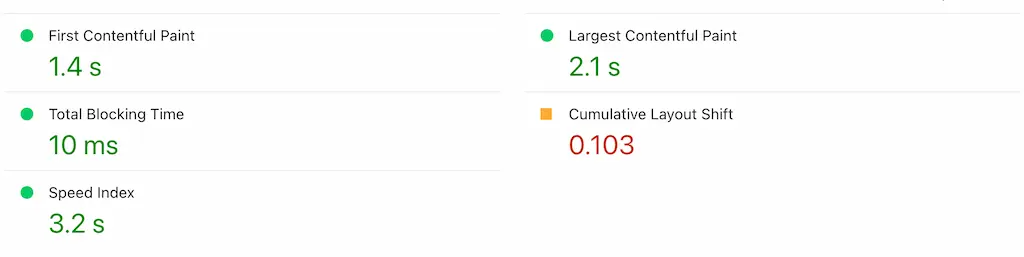
LCP measures when your main content appears. Under 2.5 seconds is good. Between 2.5 and 4 seconds needs improvement. Over 4 seconds is poor. Our mobile LCP is 2.1 seconds, which puts us in the "good" range, but when we first started it was in the red. Desktop is 0.6 seconds, which is a significant difference. Note: Never panic about mobile because Lighthouse simulates a mid-range phone on throttled 4G and it will almost always be lower, sometimes significantly, than desktop. The desktop number proves our server and content delivery are fast. The mobile gap comes from the network simulation, and 2.1s or even 3s on simulated slow 4G is totally fine for a documentation site with code blocks and images.
CLS measures visual stability. Under 0.1 is good. Ours: 1.03 mobile, 0.027 desktop. Both solid. CLS catches the thing users hate most: content jumping around while they're trying to read or click something. Images loading without dimensions, ads injecting themselves, web fonts swapping in and shifting text. If your CLS is much above 0.1, fix it before touching anything else. Users feel layout shifts viscerally, and they don't like it.
INP replaced FID in March 2024 as the third Core Web Vital. It measures responsiveness: how quickly the page reacts when someone clicks, taps, or types. Under 200 milliseconds is good. TBT is the lab proxy for INP, which is why it carries 30% of the Performance score weight.
Now, what you can safely care less about.
The overall score number. The difference between 95 and 98 is functionally meaningless. Both are green. Nobody loads a page and thinks "this felt like a 95, not a 98." If you're above 90, you're good and you can stop optimizing the score and start optimizing the actual user experience.
Speed Index and FCP are the two metrics that sound important but carry little weight. Speed Index is synthetic, not a Core Web Vital, and not a Google ranking signal. FCP tells you when the first pixel renders, which helps with debugging, but it isn't a ranking signal independent of LCP. Together they account for only 20% of the Performance score.
The mobile vs desktop gap panics people more than it should. Mobile scores are always lower because Lighthouse simulates a Moto G Power on throttled 4G. Our site drops from 98 to 95 across that divide, and that's completely normal. If your mobile Performance score is above 90, you're ahead of most of the web.
Why PageSpeed Matters for SEO
Since 2021, Core Web Vitals have been Google ranking signals. The specific metrics have evolved (INP replaced FID in March 2024), but the principle hasn't changed. Their impact, though, is frequently overstated.
Core Web Vitals are a tiebreaker. Content relevance wins first, and always has. Google's own documentation says page experience signals "align with what our core ranking systems seek to reward." Translation: if two pages have equally relevant content for a query, the faster one edges ahead. A slow site won't outrank a fast one on speed alone, and a fast site won't magically rank for irrelevant queries.
The real damage from poor performance isn't the ranking signal. It's bounce rate. A page that takes 5 seconds to load on mobile loses visitors before Google's algorithm even enters the picture. Google tracks if people leave and they don't come back. And that behavior signal feeds back into rankings through engagement metrics, creating a compounding problem where slow pages get fewer visitors, generate worse engagement data, and gradually slide further down the results page in a cycle that's difficult to reverse once it starts.
Be honest with yourself about this: PageSpeed improvements alone won't transform your rankings. Content quality, backlinks, and domain authority still dominate. But ignoring performance creates a ceiling on how well you can rank, particularly on mobile where most searches happen. In summary, PageSpeed is important until it gets to 90 and above that it becomes a vanity metric.
Why AI Crawlers Care About Your Speed
For twenty years, "optimize for search" meant "optimize for Google." Not anymore.
ChatGPT, Claude, Perplexity, Google AI Overviews, and Gemini now answer questions directly, citing sources inline. An Ahrefs study of 863,000 keywords found that 25% of Google searches now surface AI Overviews. And the sourcing patterns are completely different from traditional search: 80% of URLs cited by ChatGPT and Perplexity don't even appear in Google's top 100 results. AI citation and traditional search ranking have decoupled. Your PageSpeed work now serves two separate audiences that evaluate your site through different mechanisms.
AI crawlers like GPTBot, ClaudeBot, and PerplexityBot have timeout budgets between 1 and 5 seconds. Googlebot is patient. It will wait, retry, come back later. AI crawlers won't. If your server takes too long to respond, they move on, and your page doesn't get indexed into the AI's knowledge at all, which means it can never be cited in any AI-generated answer no matter how authoritative or well-written the content is. This is a visibility problem and not a ranking problem.
They also don't execute JavaScript. A Vercel and MERJ analysis of 500 million GPTBot requests found zero evidence of JavaScript execution. Zero. If your content depends on React hydration to appear in the DOM, AI crawlers see an empty <div id="root"></div> and move on, which means every single-page application that hasn't implemented server-side rendering or have an llms.txt file or viewable as markdown is completely invisible to AI systems regardless of how good the content is.
The speed numbers back this up. SE Ranking analyzed 2.3 million pages across 295,000 domains and found that pages with a First Contentful Paint under 0.4 seconds averaged 6.7 ChatGPT citations. Pages with FCP over 1.13 seconds averaged 2.1. A fraction of a second, a 3x difference in citation frequency. Cloudflare's bot traffic reports show GPTBot requests grew 305% between May 2024 and May 2025. This traffic source is accelerating fast.
The mechanisms are different, and that distinction matters. Google uses Core Web Vitals as a ranking signal. It's one factor among hundreds, a tiebreaker. AI crawlers use speed as a gating function. Can I fetch this page within my compute budget? Yes or no. There's no gradual penalty, no "needs improvement" middle ground. Your page loads in time, or it doesn't exist.
What To Do About It
Practical fixes, ordered by impact.
For traditional SEO, fix LCP first. It's 25% of your Performance score and the metric users actually feel. Optimize images (serve webp, set explicit width and height attributes, lazy-load below the fold). Preload your critical CSS and fonts.
Eliminate layout shifts next. CLS is also 25% of the score and the most annoying user experience problem. The usual culprits: images without dimension attributes, dynamic content injecting above the fold, web fonts loading late and swapping. Set dimensions on every image. Use font-display: swap with a fallback that matches the web font's metrics.
Don't chase 100. Green is a good goal. The engineering effort required to squeeze from 90 to 100 almost never justifies the near-zero user experience improvement.
For AI discovery, the priorities are different.
Speed is important, so consider server-side rendering. If your content requires client-side JavaScript to appear in the DOM, AI crawlers can't see it. Static generation, SSR, IRS, or having an llms.txt or markdown file available are all good solutions. We wrote a walkthrough of building a server-rendered docs site with Next.js if you want to see the approach.
Keep TTFB (Time to First Byte) under 200ms. This is the metric AI crawlers feel most. It determines whether they wait for your page or abandon the request.
Add structured data using JSON-LD, such as schema markup, FAQ blocks, author information, and article metadata. Think of structured data as an API for AI systems. The crawler can parse your prose, but structured data tells it exactly what your page is about without ambiguity. Our API documentation tools comparison covers how different tools handle AI-readiness if you want to dig deeper.
As mentioned briefly before, an /llms.txt file is also useful. It's an emerging standard for LLM-friendly content summaries, but there is some debate on if any AI bot uses it. We serve ours at jamdesk.com/llms.txt. It gives AI crawlers a table of contents for your site's content without requiring them to crawl every page.
The Score Isn't a Grade
PageSpeed isn't a report card, well, it is a report card, but mainly it should be looked at as a diagnostic tool. It is a surprisingly useful one if you look at the individual metrics instead of obsessing over whether your overall number is a 91 or a 97 or a perfect 100 that you screenshot and post on X. The individual metrics tell you what to fix.
In 2026, the audience for your site's performance isn't just Google anymore. Every AI assistant deciding whether to cite your content is running the same calculation: is this page fast enough to be worth fetching? The answer should be yes.